

Short answer
- Most free streamer libraries rule out a 24/7 music stream: StreamBeats forbids using its music "as a music radio station" and Chillhop says "Please do not use our music to create your own 24/7 music stream".
- Background music is not the same use: the same libraries are happy for their tracks to play under a game, a talk show or a video.
- Creative Commons Attribution is the widest free license: it allows use "for any purpose, even commercially", on any platform, as long as you credit the artist.
- For a music-led channel, the safest source is music you own or commissioned under a written license that names 24/7 streaming.
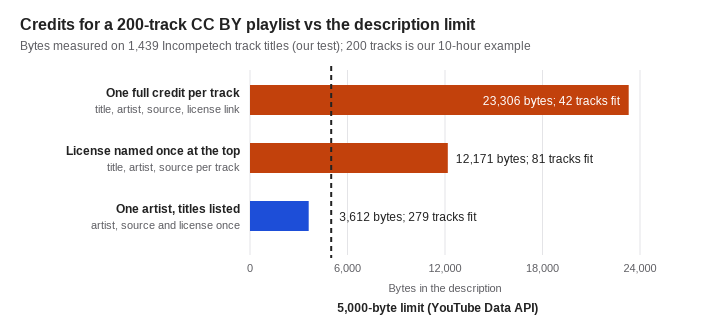
- A long CC BY playlist does not fit in one description: in our test a full credit per track took 116.5 bytes on average, so only about 42 fit in YouTube's 5,000-byte limit. Group the credits or link a credits page.
From each provider's own license page (Uppbeat: October 25, 2026). This is a guide, not legal advice.
Why 24/7 is a different use
Music licenses for creators are written around one idea: the music supports your content. A track under a gameplay stream, a vlog or a podcast is "synchronized" with something else you made. A 24/7 lofi, sleep or ambient stream turns that round. The music is what people come for, and the visual is the background.
Libraries protect themselves against that second case because it competes with their own business: their channels, their playlists and their streaming royalties. That is why the clause to look for is rarely called "24/7". It is written as "radio station", "music-only channel", "standalone" or "redistribute". If a license bans any of those, a looped music stream is very likely outside it.
Radio stations hit the same wall from the other side: a SoundExchange or PPL webcast licence covers the station's own player, not YouTube. We explain where it stops in can you stream your radio station on YouTube.
The other three things to check are the same for any channel: does the license cover live streams, does it allow monetization, and does it name the platforms you stream to. Kick is often missing, which we cover in can you play copyrighted music on Kick.
The licenses, compared
| Source and price | Live streams | 24/7 music stream | Monetize | Platforms named |
|---|---|---|---|---|
| StreamBeats | Yes: "Use it in any stream" | No: not to be used "as a music radio station" | Yes: "Monetize your content" | "Twitch, YouTube, podcasts, or equivalent platforms" |
| Chillhop Creators Program | Yes, from your Creators Dashboard only | No: "Please do not use our music to create your own 24/7 music stream" | Yes, claims released for connected channels | "YouTube or Twitch only" |
| Lofi Girl | Twitch use described in the 2022 terms | Not stated | Claims on videos published after May 20, 2026 "will generally not be removed" | "Youtube, Tik Tok, Twitch and Instagram" (2022 terms) |
| Epidemic Sound | Yes: "on the stream channel connected to your subscription" | Not stated | Yes, on paid plans | Channels you connect to the plan |
| Uppbeat | "Livestreams" listed as safe | Not stated | Yes, with a credit or a plan | "Safe for all platforms" |
| Mubert (AI-generated) | Not stated; covers "video streaming services" | Not stated; no standalone release or redistribution | Pro and Business plans only | "Videos and posts on every popular platform" |
| YouTube Audio Library | Not stated on its help page | Not stated | Yes, in the Partner Program | YouTube; no guidance "off the platform" |
| Creative Commons BY 4.0 tracks (for example Incompetech) | Yes: "any medium or format" | Yes: "for any purpose, even commercially" | Yes: "even commercially" | Any |
Prices are as shown on each pricing page on the date checked, in US dollars. Epidemic Sound's and Mubert's prices were unchanged at our last check. Uppbeat's pages showed a bot check to us on October 27 and November 4, so its figures are from October 25, 2026.
What the table does not show
StreamBeats and Chillhop: great for background, not for a music channel
Both are free and both are popular with lofi channels, and both draw the same line. StreamBeats sums its license up as "use our music in your streams, videos, and podcasts. Don't re-upload it to Spotify. Don't turn your channel into a radio station." Chillhop says "If you happen to run a music-oriented channel, please send us a message", which is the right move if you want to use its music in a music-led stream: ask, and get the answer in writing.
Lofi Girl: changed in 2026
Its Content ID page says the policy was "updated" effective May 20, 2026, and its claim release form only covers videos "published before May 20, 2026". Older guides that call Lofi Girl music free with a credit are out of date. Our lofi music licensing guide covers the change in detail.
Subscriptions: what happens when you stop paying
Epidemic Sound says content you publish "while you have a free trial or plan is protected, even after you cancel", and that if you cancel, "you have until your plan's end date to use Epidemic Sound" (pricing page). A live stream is not published once and finished, though: it keeps playing the music every day. Treat a subscription library as a running cost of a 24/7 channel, for as long as the stream is on air.
At the listed prices that cost is easy to work out. Epidemic Sound's Creator plan is "$9.99 Per month, billed $119.88 yearly", so a stream that stays on air for three years costs $359.64 in music alone (our arithmetic, at today's price). Budget it against what the channel earns, which our guide on whether lofi channels make money puts in numbers.
Creative Commons: free, but check two things
CC BY 4.0 lets you "copy and redistribute the material in any medium or format for any purpose, even commercially", provided you "give appropriate credit, provide a link to the license, and indicate if changes were made". On a stream, put the credits in the description or the About section and keep them current as the playlist changes. Check that each track really is CC BY: NonCommercial (NC) and NoDerivatives (ND) variants exist, and NC rules out a monetized channel.
On YouTube, a license does not stop an interruption
YouTube scans "all live streams" and says "your live stream can be interrupted even if you've licensed the third-party content" when your channel is not on the rights holder's allowlist (YouTube Help, copyright issues with live streams). That is the reason libraries with a claim-release or channel-connection system (Chillhop, Epidemic Sound, Uppbeat) ask you to register your channel. Do it before the first broadcast, not after the first interruption.
Crediting a CC BY playlist on a 24/7 stream (tested)
CC BY is free, but the credit is the price, and a 24/7 stream plays a lot of tracks. Creative Commons recommends that a credit include the "Title, Author, Source, and License", which it shortens to "TASL". The license itself is flexible about where the credit goes: you may give it "in any reasonable manner based on the medium, means, and context", and "it may be reasonable to satisfy the conditions by providing a URI or hyperlink to a resource that includes the required information".
The usual place for credits on YouTube is the description, and it has a hard limit. YouTube's API reference says the description "has a maximum length of 5000 bytes and may contain all valid UTF-8 characters except < and >". Bytes, not characters: an accented letter such as "é" takes 2 bytes and a Japanese character takes 3, so a title written in Japanese uses three times the space of the same number of English letters.
How many credits fit (our test)
To get real lengths we took the 1,439 track titles listed on Incompetech's licenses page (the titles average 14.5 characters) and wrote a credit for each in three formats, then counted the bytes. For the playlist we assumed 200 tracks, about 10 hours of music at 3 minutes a track (our example, not a rule).
| Format | Average bytes a track | Tracks that fit | 200 tracks need |
|---|---|---|---|
| Full credit on every line: title, artist, source link, "CC BY 4.0" and the license link | 116.5 | 42 | 23,306 bytes |
| License and its link named once at the top, then title, artist and source link per track | 60.5 | 81 | 12,171 bytes |
| One artist: artist, source and license once, then the titles in a list | 17.5 | 279 | 3,612 bytes |
What this means for a long stream:
- A playlist from many artists will not fit line by line. Even with the license named once, about 80 tracks is the ceiling, and that leaves no room for anything else in the description.
- Group by artist. When several tracks come from one artist and one source, write the artist, source and license once and list the titles under them. This is still Title, Author, Source and License for every track.
- Or link a full credits page. Put the complete list on a page you control (your website, or a pinned public document) and link it at the top of the description. That is the "URI or hyperlink" route the license itself mentions. Keep the page in step with the playlist.
Build the credit block from your files
If you tag each file as shown in our lofi music licensing guide, the credits can be written from the tags, so they never drift from the playlist. We gave three 3-second test tones the tags title, artist, license and url (the names are made up for the test; one is tagged CC BY-NC 4.0 on purpose), then ran this with ffmpeg 7.0.2:
{
echo "Music (CC BY 4.0, https://creativecommons.org/licenses/by/4.0/):"
for f in tracks/*.flac; do
  tag() { ffprobe -v error -show_entries format_tags="$1" -of default=nw=1:nk=1 "$f"; }
  if [ "$(tag license)" = "CC BY 4.0" ]; then
    printf '"%s" by %s (%s)\n' "$(tag title)" "$(tag artist)" "$(tag url)"
  else
    echo "SKIPPED $(basename "$f"): $(tag license)" >&2
  fi
done
} > credits.txt
cat credits.txt
echo "$(wc -c < credits.txt) bytes of 5000"
Our output:
SKIPPED night-bus.flac: CC BY-NC 4.0
Music (CC BY 4.0, https://creativecommons.org/licenses/by/4.0/):
"Café Lights" by Example Producer (https://example.com/cafe-lights)
"Rainy Window" by Example Producer (https://example.com/rainy-window)
204 bytes of 5000
Two things showed up. The NonCommercial track was caught and left out of the credits, which is your cue to take it out of a monetized loop too. And the block counted 204 bytes for 203 characters: the "é" in "Café" took two. Use wc -c (bytes), not a character count, when you check against the limit.
Which source fits which channel
- A music-led 24/7 stream (lofi radio, sleep music): music you made, or commissioned with a written license that names live streaming, 24/7 use and every platform you stream to. CC BY tracks are the free alternative.
- A loop where music is in the background (an ambient scene with a soft score, a game showcase): StreamBeats, Uppbeat or a subscription library fits, within their platform lists.
- Kick as the main platform: only sources whose terms cover Kick by name or by "all platforms", or music you own. See the Kick guide.
- Anything else: email the provider, describe the channel exactly ("a 24/7 looped live stream on YouTube and Kick, monetized"), and keep the written answer.
Whatever you choose, keep a playlist sheet: track, artist, source, license, link to the terms, and the date you checked them. Save a copy of each license page as it was on that date. The same sheet, with an artist and album column, is what our rotation script reads to space out artists across the loop. Terms change, as Lofi Girl's did in 2026, and the copy is your evidence of what you agreed to.
Streaming to Kick? See Loopcast for Kick. How to build the loop itself is in how to make a 24/7 lofi stream.
FAQ
Can I use royalty-free music for a 24/7 live stream?
Only if its license allows a music-led stream. "Royalty-free" means you pay no per-use fee; it does not mean any use is allowed. StreamBeats and Chillhop, for example, are royalty-free or free but both rule out a 24/7 music stream.
What is the safest free music for a 24/7 stream?
Tracks under Creative Commons Attribution 4.0, which allows use "for any purpose, even commercially", with a credit. Check each track's exact license, because the NonCommercial variant does not allow a monetized channel.
How do I credit Creative Commons music on a 24/7 stream?
Give the title, author, source and license of each track. In the description, name the license once and group tracks by artist, or link a full credits page: CC BY 4.0 says a link to "a resource that includes the required information" may be reasonable. In our test only about 42 full one-line credits fit in YouTube's 5,000-byte description.
Can I use StreamBeats for a 24/7 lofi stream?
No. StreamBeats lists "Use as a music radio station" among the things you may not do, and its license forbids operating "a music-only radio station". You can use it as background music in other streams.
Does a license stop YouTube from interrupting my stream?
Not on its own. YouTube says a live stream "can be interrupted even if you've licensed the third-party content" if your channel is not on the rights holder's allowlist. Register your channel with the library before you go live.
Is Lofi Girl music free to use in 2026?
Not in new videos. Lofi Girl updated its Content ID policy effective May 20, 2026, and claims on videos published after that date "will generally not be removed".
Sources
- StreamBeats: Licensing and Chillhop: Use our Music.
- Lofi Girl terms (dated 2022) and Content ID claim release.
- Epidemic Sound pricing and streaming page; Uppbeat pricing (behind a bot check on November 4).
- Mubert: license and pricing.
- YouTube Help: Audio Library and copyright issues with live streams.
- Creative Commons: Attribution 4.0 International deed, legal code (section 3), recommended practices for attribution and Incompetech licenses (track titles used in our credit test).
- YouTube Data API: Videos resource (description limit).
- Loopcast: YouTube page, Kick page and pricing.