

The short version
- Pick a format: uploaded mixes, a 24/7 live stream, or both.
- Get music you are allowed to use on a monetized channel and on a stream. "Copyright free" playlists are a common trap.
- Make or commission a visual you own. Anime clips are not free to use.
- Verify your channel by phone and switch on live streaming a day before you need it. Verification also unlocks uploads over 15 minutes and custom thumbnails.
- Give every upload and stream something of your own, so it does not read as "inauthentic content".
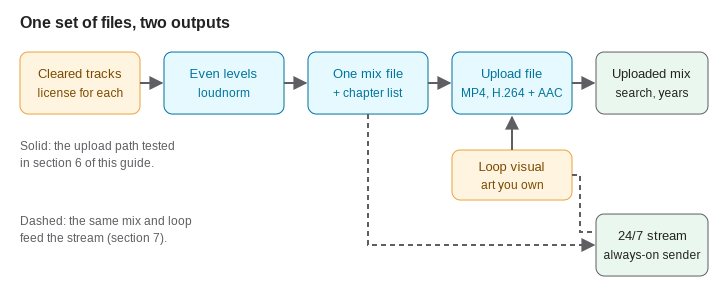
- Build each upload the same way: tracks at one loudness, one mix, a chapter list, one MP4. We tested the commands in section 6.
- Run the stream from something that stays on. Plan for no replay past 12 hours.
- Know the money rules: 1,000 subscribers and 4,000 watch hours for ad revenue today, 8,000 hours for new channels from February 1, 2027. By our arithmetic that is about 22 watch hours a day for a year.
Rules quoted from YouTube Help. Commands tested on our server.
1. Choose your format: uploads, a live stream, or both
Most lofi channels do some mix of two things: uploaded mixes (one to a few hours of music over a loop) and a live stream that plays around the clock. They behave differently on YouTube.
| Compared | Uploaded mix | 24/7 live stream |
|---|---|---|
| Length | Up to "256 GB or 12 hours, whichever is less" | No documented maximum |
| Found through | Search and recommendations, for years | The live shelf and your channel page, while it is live |
| Replay | Is the video | Plan for none past 12 hours |
| Watch hours for monetization | Count if public | Count only if public and saved as a video |
| Running cost | None after upload | A PC, a server or a hosted service, every day |
| Work | A new mix each time | Set up once, then keep it on air |
Our view: start with a few uploaded mixes to give the channel a back catalogue and something that can be found in search, then add the stream once you have music and a visual you are sure about. The stream is the part that makes a lofi channel feel like a place. Both use the same two files, so the work is not doubled:
If you would rather have a person on screen than a scene, a study with me channel works the same way, with someone working at a desk. Calmer formats follow the same steps with different sound: a relaxing or meditation music channel, or white noise and sleep sounds. For other always-on formats, from bird cams to weather screens, see our 24/7 live stream ideas compared side by side.
2. Get music you are allowed to use
This is the step most guides get wrong. The music is copyrighted, and what you may do with it depends entirely on where it comes from. Lofi Girl solves it by owning the rights: Lofi Girl releases through its own label and works "with hundreds of talented producers worldwide" (Lofi Girl).
A smaller channel has five options: its own tracks, commissioned producers, a label's creator program, the YouTube Audio Library, or a paid library. Two facts change the usual advice:
- Lofi Girl's music is "no longer free to use in newly published videos" since May 20, 2026 (Lofi Girl, Content ID).
- Free programs such as Chillhop and StreamBeats allow their music in videos and streams but not as a 24/7 radio-style stream: "Don't turn your channel into a radio station" (StreamBeats).
Paid libraries are where many "start a lofi channel" articles send you, usually without saying what the license covers. Before you pay, check three things in the terms: monetized YouTube uploads, live streams, and a stream that loops the same tracks around the clock. Our table of music licenses for 24/7 streams quotes those clauses side by side.
Our guide Where do lofi YouTube channels get their music? compares the sources, quotes their terms and gives a checklist for every track you put in a loop.
3. Make a visual you own
The looping scene matters almost as much as the music: it is the thumbnail, the brand and what people leave on a second screen. Use art you made, commissioned or licensed.
Clips from anime and films are the obvious shortcut and the obvious risk. Studio Ghibli, for example, released official stills in 2020 with the note "常識の範囲でご自由にお使いください" ("please use them freely within the bounds of common sense") (Studio Ghibli, September 18, 2020). That covers a set of still images. It is not a license to loop footage from the films, and we would not build a channel on it.
What works for a small channel:
- One illustrated scene with a few moving parts (rain, a cat's tail, steam from a mug), animated as a short seamless loop.
- Your own footage: a window, a desk, a street at night, filmed on a tripod and looped. Our fireplace video and aquarium video guides show how to film a real scene with white balance locked and turn it into a seamless loop.
- Commissioned art, with the contract saying you may use it on YouTube and in live streams, for as long as the channel runs.
Free tools such as Krita, Blender and DaVinci Resolve can make and export a looping scene. Keep the loop short, check the seam, and render one long file for streaming. Our guide to making ambient videos covers crossfades, 4K versus 1080p and file size; if rain is part of the sound as well as the picture, rain sound videos covers recording it and what "copyright free" rain allows.
The channel name, profile picture and banner can come from the same art: a crop of the scene for the profile picture, a wide strip of it for the banner. Keep the world the same across uploads (the room, the character, the colors) and change the scene in each mix: the season, the time of day, what is on the desk. Viewers recognize the channel, and you stay clear of the "minimal variation across videos" that YouTube warns about in section 5.
4. Set up the channel for live streaming
Three requirements catch people on launch day:
- Verification: a verified account (by phone) can "Upload videos longer than 15 minutes", "Add custom thumbnails" and "Live stream" (YouTube Help, verify your account). Every lofi mix is longer than 15 minutes, so do this first.
- Waiting time: "Enabling a live stream for the first time may take up to 24 hours" (YouTube Help, encoder live streaming). Switch it on the day before.
- Eligibility: "no live streaming restrictions in the past 90 days", and "You must be at least 16 years old to live stream" (YouTube Help, live streaming restrictions). Streaming from a phone also needs "At least 50 subscribers" (YouTube Help, mobile live); a 24/7 lofi stream runs from an encoder or a hosted service, so this rarely applies.
Pick a lofi channel name and handle
Lofi channel names are a crowded space, so pick one people can find and remember. Every channel also gets a handle (the @name in its link). YouTube's rules for a handle: it "Is between 3-30 characters", may use "underscores (_), hyphens (-), periods (.)" but "not at the beginning or end", and "Is not already being used" (YouTube Help, handles). What works for a lofi channel name:
- Say the mood or the place, not just "lofi". A name built on a scene (a rainy city, a night train, a small studio) gives you a visual and a series in one. "Lofi" alone is in thousands of channel names.
- Keep the name and the handle the same. Check that the @handle is free before you put the name on a logo or banner.
- Stay clear of other channels' names. A name close to Lofi Girl, Chillhop or a label confuses viewers and invites a complaint. Search YouTube for your name before you use it.
- Leave room to grow. A name tied to one genre or one season ("lofi fall beats") is hard to keep when you add sleep, jazz or study streams.
Chapters, which section 6 uses for the track list, can also be locked on a new channel: "If you don't yet have access to chapters, apply for access to Advanced features" (YouTube Help, video chapters).
5. Stay clear of YouTube's "inauthentic content" rule
This is the rule most likely to block a lofi channel from earning money. In July 2025 YouTube renamed its "repetitious content" policy: "We are also renaming this policy from 'repetitious content' to 'inauthentic content.'" Channels in the Partner Program must "Not be mass-produced, generic, repetitive, or manipulative" (YouTube Help, channel monetization policies).
The examples YouTube gives read like a description of a lazy lofi channel:
"Similar or repetitive content with low educational value, commentary, narratives, or minimal variation across videos"
"Image slideshows, templated storylines, or scrolling text with minimal or no narrative, commentary, or educational value"
"AI-generated content made with generic or unoriginal templates giving the impression of mass production"YouTube Help, channel monetization policies
The separate "reused content" rule hits compilation channels directly. Among its examples of what is not allowed: "Collections of songs from different artists (even if you have their permission)" (same page). A channel that only re-uploads other people's lofi, even with a license, is exposed.
What we would do so each upload is clearly yours:
- Music that is yours, or curated by you with a reason: a mood, a season, a series of producers you introduce in the description.
- A visual you made, varied across uploads instead of one image on every video.
- Track lists with timestamps and credits for every mix (section 6 makes the timestamps for you).
- Fewer, better uploads rather than many near-identical ones.
Our guide to inauthentic content and 24/7 channels holds common loop formats against each of YouTube's examples and lists what counts as added value for a loop.
If you use AI anywhere, note that YouTube's disclosure page lists "AI generated music" among the examples creators need to disclose (YouTube Help, disclosing use of GenAI content), and that free tiers of AI music tools are often limited to non-commercial use. Our music licensing guide has the details.
6. Build your first upload, step by step (tested)
An uploaded mix is one MP4: your tracks joined at one loudness, under your loop, with a chapter list in the description. Any video editor can do it. If you would rather run the same four commands every week, these are the ones we ran with ffmpeg 7.0.2. They expect a folder tracks/ with your cleared tracks named in play order (01-first-light.flac, 02-late-bus.flac and so on) and your loop as loop.mp4. Keep apostrophes out of the file names: step 2 wraps each name in single quotes.
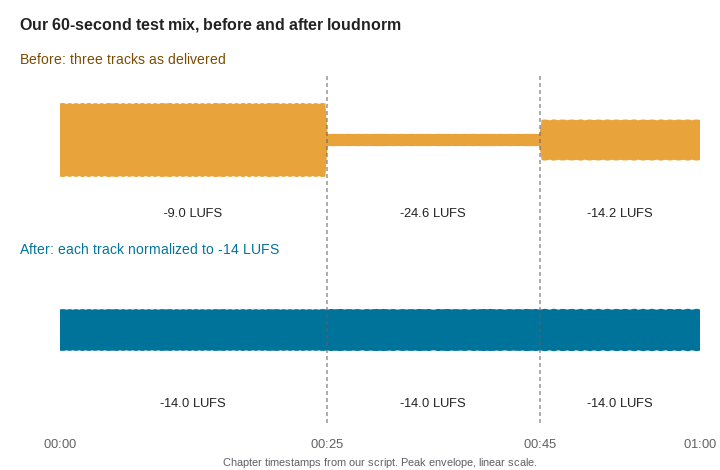
Step 1: bring every track to one loudness. A quiet track after a loud one is what makes a listener reach for the volume, and what turns a background mix into a foreground one.
mkdir -p norm
for f in tracks/*.flac; do
  ffmpeg -hide_banner -loglevel error -i "$f" \
    -af loudnorm=I=-14:TP=-1.5:LRA=11 -ar 48000 \
    "norm/$(basename "${f%.*}").wav"
doneI=-14is the target loudness in LUFS. It is our choice for this test, not a YouTube rule; what matters is that every track gets the same target.-ar 48000matters: ffmpeg's manual says that to detect true peaks "the audio stream will be upsampled to 192 kHz", and 48 kHz is the "Sample rate" YouTube recommends for uploads (YouTube Help, recommended upload encoding settings).
Step 2: join them into one mix. Join the WAV files, not the original MP3s: in our 24/7 playlist test, MP3s joined directly left a gap of 26 to 51 ms at every join.
for f in norm/*.wav; do echo "file '$f'"; done > list.txt
ffmpeg -f concat -safe 0 -i list.txt -c copy mix.wav
Step 3: write the chapter list. This reads the length of each track, adds them up and prints a timestamp and a name for each, with hours only once the mix passes an hour:
for f in norm/*.wav; do
  len=$(ffprobe -v error -show_entries format=duration -of csv=p=0 "$f")
  printf '%s\t%s\n' "$len" "$(basename "${f%.*}")"
done | awk -F'\t' '{
  s = int(t)
  if (s >= 3600) printf "%d:%02d:%02d %s\n", s/3600, (s%3600)/60, s%60, $2
  else printf "%02d:%02d %s\n", s/60, s%60, $2
  t += $1
}' > chapters.txt
On our test files, chapters.txt came out as:
00:00 01-first-light
00:25 02-late-bus
00:45 03-window-seat
With made-up lengths of 1,800 and 1,902 seconds for the first two tracks, the third line came out as 1:01:42, so the hour format works too. Replace the file names with track titles and credits before you paste the list into the description. YouTube's rules for chapters: "Make sure that the first timestamp you list starts with 00:00", "Your video should have at least three timestamps listed in ascending order" and "The minimum length for video chapters is 10 seconds" (YouTube Help, video chapters). Any real lofi track clears 10 seconds.
Step 4: put the mix under the loop.
ffmpeg -stream_loop -1 -i loop.mp4 -i mix.wav -map 0:v -map 1:a \
  -t "$(ffprobe -v error -show_entries format=duration -of csv=p=0 mix.wav)" \
  -c:v libx264 -profile:v high -preset medium -crf 20 -pix_fmt yuv420p \
  -r 30 -g 15 -bf 2 -flags +cgop \
  -c:a aac -b:a 384k -ar 48000 \
  -movflags +faststart -use_editlist 0 upload.mp4
Each setting follows a line of YouTube's recommended upload encoding settings:
-profile:v high,-bf 2,-g 15 -flags +cgop: "High Profile", "2 consecutive B frames" and "Closed GOP. GOP of half the frame rate." At 30 frames per second, half the frame rate is 15 frames.-movflags +faststart: "moov atom at the front of the file (Fast Start)".-use_editlist 0: YouTube asks for "No Edit Lists (or the video might not get processed correctly)". ffmpeg's MP4 setting defaults to "auto", and our first render without this option had two edit lists in it.-twith the mix length, instead of-shortest: with-shortest, our first render ran one second past the end of the music.-c:a aac -b:a 384k -ar 48000: AAC-LC, stereo, "384 kbps" and 48 kHz, as on YouTube's page.-crf 20lets the encoder spend the bits the picture needs. YouTube says "No bitrate limit is required" and gives 8 Mbps for 1080p at standard frame rates as a reference.
For the thumbnail, take a frame from the loop:
ffmpeg -ss 2 -i loop.mp4 -frames:v 1 -q:v 2 thumb.jpgFrom our test loop this gave a 1920 by 1080 JPEG of 18 KB. YouTube recommends "a resolution of 3840 x 2160 pixels for videos", "a minimum width of 640 pixels" and JPG or PNG (YouTube Help, custom thumbnails), so if your art exists in 4K, take the frame from the 4K file.
| Test | Result |
|---|---|
| Track loudness before step 1 | -9.0, -24.6 and -14.2 LUFS |
| After step 1 | All three at -14.0 LUFS, peaks at -8.3 to -8.4 dBFS |
| Mix after step 2 | 60.000 seconds, exactly 25 + 20 + 15 |
| Chapter list, step 3 | 00:00, 00:25, 00:45, matching the track starts |
| Upload file, step 4 | H.264 High, 1920 by 1080, 30 fps, a keyframe every 0.5 seconds; AAC-LC at 48 kHz stereo; index at the start; no edit lists; 60.07 seconds long |
| Calm loop | 1.99 MB for the minute, video at 28 kbps, encoded at 4.24 times real time |
| Busy test pattern | 62.9 MB for the minute, video at 8.15 Mbps, encoded at 2.31 times real time |
| Audio bitrate | 228 kbps on our test tones, although we asked for 384 kbps |
What that means for a one-hour mix, by our arithmetic from the table: with a calm scene, about 120 MB and 14 minutes of encoding; with a picture as busy as the test pattern, about 3.8 GB and 26 minutes. Both are far under YouTube's "256 GB or 12 hours" upload limit. Encoding speed depends on the machine: ours is a shared 12-thread server that gave this job at most 8 threads at low priority.
For a 24/7 stream, the same mix.wav and loop go into one long file instead; our guide to making a 24/7 lofi stream covers the mix length and the stream settings, which differ from upload settings.
7. Put the stream on air and keep it there
A lofi stream is one long video file (your loop with the music mixed in) sent to YouTube nonstop. YouTube's settings page lists H.264, H.265 (HEVC) and AV1 as video codecs, recommends a keyframe every 2 seconds ("Do not exceed 4 seconds") and AAC or MP3 audio (YouTube Help, live encoder settings).
Three things to plan for:
- The 12-hour line. A stream over 12 hours "may not be captured at all", so plan for no replay, and know that live hours only count toward monetization if the stream is saved as a video. Details and the trade-off in our time limit guide.
- Licensed music can still interrupt a stream. YouTube says a live stream "can be interrupted even if you've licensed the third-party content" when your channel is not on the rights holder's Content ID allowlist (YouTube Help, copyright issues with live streams). Ask your music source about it before you go live.
- Uptime. YouTube documents no maximum length, so whatever sends the stream is the weak point. Your home upload speed has to carry the stream around the clock; YouTube's table lists the bitrate for each resolution.
A stream that runs for weeks also needs a playlist that does not repeat too soon and a chat that someone looks after. Our guides to building a 24/7 music stream playlist and moderating YouTube live chat on a 24/7 stream cover both.
| Compared | Hosted: Loopcast (our pick) | Your own PC with OBS | A rented server (VPS) with ffmpeg |
|---|---|---|---|
| What has to stay on | Nothing on your side | Your computer and home connection | A server you set up and maintain |
| Restart after a drop | Automatic | You, or a script you write | A script you write |
| Cost | $0.72 per 24 hours, prepaid | Electricity and wear on your PC | Monthly server rent plus your time |
| Platforms | YouTube, Kick, Steam (no Twitch) | Any | Any |
If you go the OBS or VPS route instead, our guide to looping a video in OBS Studio covers the home PC setup, and Loopcast's free articles on encoder settings for a 24/7 loop and choosing a video that holds up on a loop apply to any setup.
8. Know the money rules before you count on them
| Tier | Subscribers | Watch time (long-form) | Other |
|---|---|---|---|
| Fan funding | 500 | 3,000 hours in 12 months | 3 public uploads in 90 days |
| Ad revenue, today | 1,000 | 4,000 hours in 12 months | or 10 million Shorts views in 90 days |
| Ad revenue, new channels from Feb 1, 2027 | 1,000 | 8,000 hours in 365 days | or 20 million Shorts views in 90 days |
The 2027 change, in YouTube's words: "Starting Feb. 1, 2027, YPP entry thresholds for new creators are changing to 8,000 qualified watch hours in the last 365 days, or 20M qualified Shorts views in the last 90 days, in addition to still needing 1k subscribers. If you are already in YPP, your status is not impacted by this update." (YouTube Help). For a channel starting now, that date matters: reach the current bar before it, or plan for twice the watch hours. The fan funding tier does not move: "There are no changes to the eligibility requirements for fan funding" (same page).
Here is what those bars mean per day:
| Goal | Watch hours | Days | Hours per day | 20-minute views per day |
|---|---|---|---|---|
| Fan funding | 3,000 | 365 | 8.2 | 25 |
| Ad revenue, today | 4,000 | 365 | 11.0 | 33 |
| Ad revenue, from Feb 1, 2027 | 8,000 | 365 | 21.9 | 66 |
| Today's bar, met before Feb 1, 2027 by a channel starting in early November | 4,000 | 89 | 44.9 | 135 |
A brand-new channel reaching 45 watch hours a day from its first week is rare, so for most people starting now the planning number is the 2027 one: about 22 hours a day for a year. On a stream that is saved as a video, 22 hours a day is the same as just under one viewer (0.91) listening around the clock, on average, all year.
The same page adds an activity rule: from February 1, 2027, a channel in the program counts as active if it has "1,000 qualified watch hours in the past 365 days, or 1 million qualified Shorts views in the last 90 days, or 2 long-form videos or 5 Shorts uploaded every 90 days". A channel that only streams should keep an eye on that.
Live hours count, with a condition. YouTube excludes "Livestreams that are unlisted, deleted, or not converted to VOD (video on demand)" (YouTube Help). In our reading, a stream that runs past 12 hours and is not archived falls into that exclusion. One way around it is to restart the stream before the 12-hour mark.
Shorts clips cut from your mixes can bring people to the channel, but they do not fill the long-form bar: "any qualified watch hours from Shorts views in the Shorts Feed won't count towards the 4,000 qualified public watch hours threshold" (YouTube Help).
How much a lofi channel actually earns, and what running a stream costs per day against that, is the subject of our guide Do lofi channels make money?
9. A realistic first 90 days
This is the plan we would follow. It is a sequence, not a promise of numbers.
| When | Do | Done when |
|---|---|---|
| Week 1 | Decide the mood and name. Line up music: your own, commissioned, or a source whose terms you have read. | You have a license or proof for every track |
| Week 2 | Make or commission the visual. Verify the channel and switch on live streaming. | Live streaming is enabled; the loop has no visible seam |
| Weeks 3 to 4 | Publish three uploaded mixes with track lists, chapters and credits, built with the steps in section 6. | No Content ID claims you cannot explain |
| Weeks 5 to 6 | Start the 24/7 stream. Decide: one continuous stream, or restarts before 12 hours. | The stream has run a full week without you touching it |
| Weeks 7 to 12 | One new mix a week, each different in music and visual. Read YouTube Studio: where do viewers come from, live or uploads? | You know which format grows the channel, and you put more time into it |
The same plan in numbers:
| Item | Number | How we got it |
|---|---|---|
| Uploaded mixes by day 90 | 9 | 3 in weeks 3 to 4, then 1 a week in weeks 7 to 12 |
| Track slots to fill | 216 | 24 tracks per one-hour mix, times 9 |
| Encoding time, all 9 mixes | About 2 hours 7 minutes | 60 minutes divided by our calm-scene speed of 4.24, times 9 |
| Upload size, all 9 mixes | About 1.1 GB | 1.99 MB per minute, times 60, times 9 |
| Hours the stream is on air | 1,488 | Day 29 to day 90 is 62 days, times 24 |
| Long-form uploads for YouTube's 2027 activity rule | 2 every 90 days | The plan makes 9 |
| Watch hours by day 90, on pace for 8,000 in a year | About 1,970 | 21.9 a day, times 90 |
The track count is the number that surprises people. Few new channels have 216 cleared tracks, which is one more reason to make or commission music early. If you reuse tracks across mixes, change the order, the mood and the visual each time, so no two uploads are near-copies.
FAQ
How do I start a lofi YouTube channel with no experience?
Follow the order in this guide: choose uploads, a stream or both; get music you are allowed to use; make a visual you own; verify the channel and switch on live streaming a day early; then build every mix the same way. You do not need to produce music yourself if you commission tracks or use a library whose terms cover monetized videos and streams.
Do lofi YouTube channels make money?
They can, once the channel is in the YouTube Partner Program: 1,000 subscribers and 4,000 watch hours in 12 months today, and 8,000 watch hours in 365 days for new channels from February 1, 2027. Ad money on a video with claimed music can go to the rights owner. Our guide Do lofi channels make money? has the numbers.
Can I use Lofi Girl music on my channel?
Not in new videos. Lofi Girl's music is "no longer free to use in newly published videos" since May 20, 2026. Free programs such as Chillhop and StreamBeats allow videos and streams but not a 24/7 radio-style stream.
Are AI lofi channels allowed to earn?
YouTube's inauthentic content rule names "AI-generated content made with generic or unoriginal templates giving the impression of mass production", and its disclosure page lists "AI generated music" among the things to disclose. A channel with mixes that all sound and look alike is at risk whether or not it uses AI. Section 5 shows what to add so each upload is your own.
How long does it take to grow a lofi channel?
Plan on months, not weeks. Our 90-day plan above makes 9 uploads and a running stream, and the 2027 bar works out to about 22 watch hours a day for a year. Channels that put out one new, distinct mix a week and keep a stream on air give themselves the most chances to be found.
The full list of guides in this series is below, in reading order. New guides are linked as they are published.