

Short answer
- Hide the seam with a crossfade: fade the last few seconds of the clip into its first few seconds, so the end of the file leads straight back into its start. The ffmpeg command below does it in one step; we tested it.
- Then repeat the clip, copying the picture and encoding the sound once from a WAV cut to the picture's exact length, to reach 8, 10 or 12 hours. YouTube uploads stop at "256 GB or 12 hours, whichever is less".
- 4K or 1080p: YouTube recommends 35 to 45 Mbps for a 4K upload and 8 Mbps for 1080p, at 24 to 30 fps. Ten hours of 4K comes to 160 to 205 GB, ten hours of 1080p to about 38 GB.
- Your own footage is the safe choice. Free stock footage is licensed for this, but YouTube's reused content rule "applies even if you have permission from the original creator", so add something of your own.
From YouTube Help, the ffmpeg documentation and the Pexels, Pixabay and Creative Commons licence pages, plus our own ffmpeg tests.
1. Footage you are allowed to use
There are two questions here, and they are separate. Copyright decides whether you may use the clip at all. YouTube's monetization policy decides whether a channel built on it can earn. A clip can pass the first and fail the second.
| Source | Can you use it? | What to watch |
|---|---|---|
| Footage you filmed | Yes | Recognisable people and private property in shot; a tripod and a long take save a lot of editing. Filming on trains or ferries has its own rules: see our slow TV guide |
| Pexels | Yes: "All photos and videos on Pexels are free to use", attribution "is not required" | "Identifiable people may not appear in a bad light"; you may not "redistribute or sell the photos and videos on other stock photo or wallpaper platforms" |
| Pixabay | Yes, without having to attribute the author | You "cannot sell or distribute Content [...] on a Standalone basis", meaning "where no creative effort has been applied"; "It is your responsibility to check whether you require the consent of a third party" |
| CC0 (public domain) clips | Yes: you can use the work "even for commercial purposes, all without asking permission" | CC0 does not cover "the rights that other persons may have in the work", such as the people in it |
| Clips from other YouTube channels or films | No, without the owner's written permission | Even with permission, it can count as reused content (below) |
Pixabay's standalone rule matters for ambient channels in particular. A stock clip looped unchanged for ten hours is close to "substantially the same form as it exists on our website". Grading the colour, combining clips, adding your own sound design or overlays is the creative effort both the licence and YouTube look for.
2. What YouTube counts as your own work
YouTube's monetization policies have two rules that apply to ambient channels. The reused content rule covers channels that "repurpose content that's already on YouTube or another online source without adding significant original commentary, substantive modifications, or educational or entertainment value". And it is not a copyright rule: "This policy applies even if you have permission from the original creator."
The inauthentic content rule covers channels where "content feels interchangeable from video to video", including "Similar or repetitive content with low educational value, commentary, narratives, or minimal variation across videos". YouTube also says the reused content rule "applies to your channel as a whole", so a few problem videos can remove monetization from all of them.
In practice that points to three habits. Film your own scenes where you can, with the owner's permission if the scene is a business such as a coffee shop. When you use stock, change it: edit, grade, layer, and build the sound yourself (for a soundtrack of calm music, see relaxing music channels). And make each video different from the last, not the same rain with a new title. Our guide to inauthentic content and 24/7 channels goes through the wording in detail. The same habits apply if the scene is a desk with a person working at it, as in a study with me channel.
3. Make a loop nobody notices
Most footage does not loop. The water, the smoke or the traffic at the last frame is in a different place than at the first, and the viewer sees a jump every time the clip restarts. The fix is a crossfade: take the last few seconds of the clip and fade them into its first few seconds, so the file ends on exactly the frame it starts with.
ffmpeg has a filter for each half. xfade is documented as "Apply cross fade from one input video stream to another input video stream", and acrossfade does the same for audio. This command takes a 12-second clip and a 2-second fade:
ffmpeg -ss 2 -i clip.mp4 -t 2 -i clip.mp4 -filter_complex \
  "[0:v][1:v]xfade=transition=fade:duration=2:offset=8,format=yuv420p[v];[0:a]aformat=sample_fmts=flt[f0];[1:a]aformat=sample_fmts=flt[f1];[f0][f1]acrossfade=d=2:c1=qsin:c2=qsin,alimiter=limit=0.95:level=0:latency=1[a]" \
  -map "[v]" -map "[a]" -c:v libx264 -crf 18 -g 15 -c:a aac -b:a 192k seamless.mp4
How it works: the first input is the clip from second 2 to the end, the second input is its first 2 seconds. offset ("Set cross fade start relative to first input stream in seconds") starts the fade 2 seconds before the first input ends, so its tail dissolves into the clip's opening. The result is 10 seconds long and its last frame leads into its first. For your own clip, set -ss, -t and duration to the fade length, and offset to the clip length minus twice the fade length. -g 15 puts a keyframe every 15 frames, YouTube's "GOP of half the frame rate" for 30 fps footage; use -g 12 for 24 fps.
We tested it on our server, with a clip that changes colour steadily from start to end. In the original, the colour jumped from one end of the scale to the other when the clip restarted. In the crossfaded file, the last and first frames were within 3 levels of each other. The clip has no audio? Drop everything after [v]; in the filter and the second -map. c1=qsin:c2=qsin sets the sound fade curves; with the default straight-line curve, a steady background such as rain or a hum dips about 3 dB in the middle of the fade, which our fireplace crossfade test measured.
aformat=sample_fmts=flt and the alimiter are there for loud, steady sound. Many cameras record their sound as 16-bit PCM, not AAC, and ffmpeg's crossfade then adds the two sides up in 16 bits without clipping them, so where they add up past full scale the sample jumps to the other end of the range: a hard click, the same fault our relaxing music guide measured on music joins. We gave this command a 12-second clip with a steady 80 Hz hum at -0.5 dBFS, recorded as 16-bit PCM. Without the two additions the crossfaded file had 592 wrapped samples (611 in the AAC file); with them, none, and the file is still exactly 10 seconds. We also looped generated test sounds onto themselves with the 16-bit fade: a steady drone wrapped in 44 of 100 loops at -0.3 dBFS, 32 of 100 at -1 dBFS and 1 of 100 at -3 dBFS, while a fire crackle bed with pops up to -0.3 dBFS wrapped in none of 100. The default straight-line curve never wrapped (0 of 300), because its two gains always add up to exactly 1; the equal-power qsin curve adds up to as much as 1.41 in the middle. With the float input and the limiter, 0 of 300. The limiter only acts above -0.45 dBFS. AAC sound in an .mp4 is already decoded as float, so a phone clip was never at risk, but the extra filters cost nothing.
We measured how big the jump is and what the fade length changes. We played each 12-second test clip three times in a row and measured, frame by frame, how much the picture changed from one frame to the next (the average brightness difference, on a scale of 0 to 255):
| Loop | Change at the join | Largest change anywhere in the loop |
|---|---|---|
| No fade (clip restarts) | 26.06 | 26.06, at the join |
| 1-second crossfade | 0.70 | 1.83, inside the fade |
| 2-second crossfade | 0.88 | 1.13, inside the fade |
| 3-second crossfade | 0.76 | 0.86, inside the fade |
Without a fade, the restart was about 40 times bigger than a normal frame change: the jump a viewer sees once per loop. With any of the three fades, the join itself looked like an ordinary frame. The fade itself is the price: it blends two different moments, so the picture changes faster while it runs. A 1-second fade nearly tripled the normal change rate; a 3-second fade raised it by about a third. The longer the fade, the less it stands out.
- Pick a slow fade for slow scenes. 2 to 5 seconds suits rain, snow or clouds. Fast motion, such as traffic, can show the dissolve as ghosting; a cut on a moment of similar movement may look better there.
- Keep the camera still. A handheld or panning shot will show the fade as a double image; for footage like that, a ping-pong loop can work instead. Static shots loop best. For a fire, also lock exposure and white balance; our fireplace video guide covers filming it and recording the crackle. Behind glass, reflections are the extra problem; our guide to filming a fish tank for YouTube shows how to avoid them.
- Watch out for things that pass through. A car or a person who appears only in the last seconds will fade out in the middle of the frame.
4. Turn the loop into a long video
Once the short loop is seamless, repeat it to the length you want. Keep the sound out of AAC until the last step: first save the loop's sound once more as an uncompressed WAV, with the same crossfade, cut to exactly the length of the picture (here the 12-second clip):
ffmpeg -i clip.mp4 -i clip.mp4 -filter_complex \
  "[0:a]atrim=start=2:end=12,asetpts=PTS-STARTPTS,aformat=sample_fmts=flt[a0];[1:a]atrim=end=2,asetpts=PTS-STARTPTS,aformat=sample_fmts=flt[a1];[a0][a1]acrossfade=d=2:c1=qsin:c2=qsin,alimiter=limit=0.95:level=0:latency=1" \
  -c:a pcm_s16le seamless.wav
atrim cuts the sound at exact sample positions: start is the fade length and end is the length of the clip's picture, which ffprobe -v error -select_streams v -show_entries stream=duration -of csv=p=0 clip.mp4 prints. Why not the same -ss and -t as for the picture? Because the sound in a video file is rarely exactly as long as the picture, and in a long repeat that small difference adds up (see the drift test below).
Then repeat the picture without re-encoding it and encode the repeated sound once:
ffmpeg -stream_loop 3599 -i seamless.mp4 -stream_loop -1 -t 36000 -i seamless.wav \
  -map 0:v -map 1:a -c:v copy -c:a aac -b:a 192k -movflags +faststart ten-hours.mp4
-stream_loop 3599 plays the 10-second picture loop 3,600 times, exactly 10 hours (36,000 seconds); for another loop length, divide 36,000 by it and subtract one. -stream_loop -1 -t 36000 repeats the sound without end and cuts it at 10 hours. An earlier version of this command cut the whole file with -t 36000; with copied video that ends the file on a stray frame or two of the next pass, a small skip each time the file restarts, as our long-file test found. We at one-hour scale (-stream_loop 359, -t 3600): 108,000 frames and exactly 3,600.000 s of picture and sound. -map 0:v -map 1:a takes the picture from the loop and the sound from the WAV. -movflags +faststart puts the index at the start of the file, which is YouTube's recommended "moov atom at the front of the file (Fast Start)". The picture is copied, so the job still runs much faster than real time; only the sound is encoded.
Why not copy the sound too? We tested the simpler -c copy version on October 29, 2026: every join of the AAC sound got about 37 ms of silence (1,792 samples at 48 kHz), which plays as a small dropout once per loop. Re-encoding the AAC loop still left about 16 ms. The WAV version above had no silent gap at any join. Our guide to seamless loop videos explains where the gap comes from.
Our test: sound that drifts away from the picture
The first version of this guide cut the WAV with the same -ss 2 and -t 2 as the picture. We checked whether picture and sound still line up after hours of repeating. We made a 12-second test clip with a sync mark at second 5: one white frame and a 100 ms beep at the same moment. We built a one-hour file from it both ways and measured, at the start, at 30 minutes and at 60 minutes, how far the beep came after the flash.
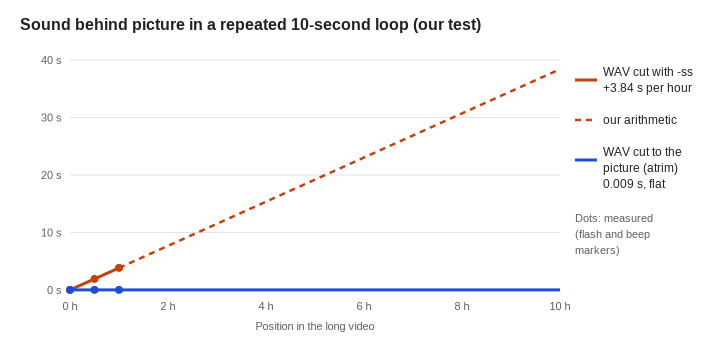
With the old command, the beep came 0.009 s after the flash at the start, 1.93 s after it at 30 minutes and 3.84 s after it at the end of the hour. The cause was in the source clip: its picture was 12.000 s long and its AAC sound 12.011 s, because AAC stores sound in blocks of 1,024 samples and the last block ran past the picture. So the sound loop came out 480,512 samples (10.011 s) long against a 10.000 s picture loop, and fell another 10.7 ms behind every time round. Over 10 hours that is about 38 seconds (our arithmetic). With the atrim command above, the sound loop was exactly 480,000 samples and the lag stayed at 0.009 s for the whole hour.
Both versions still looped without a click, because each loop joins up on its own. The drift only matters when a sound belongs to something you see: thunder after a flash of lightning, a wave breaking, a log falling in a fire. For pure rain or a hum, nobody will notice. For anything else, cut the sound to the picture.
A longer source loop hides repetition better than a short one. Viewers who stay for hours notice a 10-second cycle; a 5 or 10 minute loop built from several shots is much harder to spot. YouTube's verified-account limit is "256 GB or 12 hours, whichever is less", and our guide to sleep sounds channels compares long uploads with a 24/7 stream for this kind of content. For rain, our guide to making rain sound videos builds the same long file over a black screen and measures its size per hour.
5. 4K or 1080p, and how big the file gets
YouTube's recommended upload settings are MP4, H.264, "Closed GOP. GOP of half the frame rate", AAC or Opus audio at 48 kHz, and a variable bitrate with "No bitrate limit". For the bitrate, it gives these figures for SDR video:
| Resolution | Video at 24, 25 or 30 fps | Video at 48, 50 or 60 fps | 10 hours at 30 fps, about |
|---|---|---|---|
| 2160p (4K) | 35 to 45 Mbps | 53 to 68 Mbps | 160 to 205 GB |
| 1440p (2K) | 16 Mbps | 24 Mbps | 74 GB |
| 1080p | 8 Mbps | 12 Mbps | 38 GB |
| 720p | 5 Mbps | 7.5 Mbps | 24 GB |
At those rates a 12-hour 4K upload at 45 Mbps comes to about 245 GB, just inside the 256 GB limit. A 12-hour upload at 60 fps in 4K would not fit; at that length, use 24 or 30 fps, which is what slow ambient scenes need anyway. YouTube's own advice is that "Content should be encoded and uploaded in the same frame rate it was recorded".
Is 4K worth it? Only if the footage was shot in 4K: scaling 1080p up adds size, not detail. If it was, a 4K upload lets viewers on large screens watch in 4K, though YouTube notes that to watch "new 4K uploads in 4K, use a browser or device that supports VP9". For a 24/7 live stream the trade-off is different: YouTube recommends 42 Mbps for a 4K stream at 30 fps with H.264, against 14 Mbps for 1080p, and a 4K stream runs at normal latency only. Most ambient streams run at 1080p.
6. Run it as a 24/7 stream instead
A long upload is one video. A live stream of the same loop sits in the Live tab around the clock and can be found while it is on. Many ambient channels do both. The stream needs a sender that never stops: a PC, a rented server, or a hosted service that plays your file on repeat. Our guide to making a 24/7 lofi stream compares the three, with YouTube's encoder settings.
Before you upload
- The footage is yours, or its licence allows video use without attribution or with the credit you give, and nobody recognisable is shown in a bad light.
- You changed stock footage: edited, graded, layered or combined, with your own sound.
- This video is clearly different from your last one.
- You watched the end of the file run into its start and could not see or hear the join.
- The WAV loop is exactly as long as the picture loop, so a sound tied to something on screen is still in step at the last hour.
- The source loop is minutes long, not seconds, if the video runs for hours.
- The file is under 12 hours and 256 GB, at the frame rate you filmed in, with the index at the start.
FAQ
How do I make a video loop seamlessly?
Crossfade the last few seconds of the clip into its first few seconds, so the file ends on the frame it starts with. The ffmpeg command in this guide does it with the xfade and acrossfade filters, and any video editor can do the same with a cross dissolve.
Can I use Pexels or Pixabay videos for an ambient channel?
The licences allow it without attribution. But looping a stock clip unchanged is risky twice over: Pixabay does not allow distribution "on a Standalone basis" with no creative effort, and YouTube's reused content rule "applies even if you have permission from the original creator". Edit and combine the footage and add your own sound.
Should I upload ambient videos in 4K?
If the footage was shot in 4K, yes for uploads: YouTube recommends 35 to 45 Mbps at 24 to 30 fps. A 12-hour 4K file at that rate is about 245 GB, close to the 256 GB limit, so keep the frame rate at 24 or 30. Upscaled 1080p gains nothing.
Why is the sound out of sync late in my 10-hour video?
Most likely the sound loop is slightly longer than the picture loop, so it falls further behind on every repeat. In our test a 10.011 s sound loop under a 10.000 s picture loop was 3.84 s late after one hour. Cut the WAV with atrim to the picture's exact length, as in the command above, and the lag stays the same from start to end.
How long can an ambient video on YouTube be?
Verified accounts can upload "256 GB or 12 hours, whichever is less". For anything longer, use a 24/7 live stream of the same loop.
Do ambient channels get monetized?
They can be, but YouTube's inauthentic content rule names "Similar or repetitive content with low educational value, commentary, narratives, or minimal variation across videos". Channels with their own footage and clearly different videos are on firmer ground than channels that loop the same stock clip.
Sources
- YouTube Help: recommended upload encoding settings, uploading videos longer than 15 minutes, YouTube channel monetization policies and live encoder settings.
- ffmpeg filters documentation (xfade, acrossfade, atrim).
- Pexels License, Pixabay Content License summary and CC0 1.0 deed.
- Seamless loop and 10-hour repeat commands tested on our server with ffmpeg 7.0.2; seam measurement by fade length and the one-hour picture and sound sync test.
- Loopcast: YouTube page and pricing.