

Short answer
- Animation (lofi scenes): draw a cycle whose last frame leads into the first. Do not repeat frame 1 at the end; that adds a held frame at every join.
- Real footage that drifts: crossfade the last seconds into the first seconds. In our test the jump at the join fell from 112.9 to 1.4 on ffmpeg's frame difference scale, inside the normal range of the clip.
- Motion that looks natural both ways: a ping-pong loop, forward then backward. Drop the two turnaround frames from the backward half or the picture stops for a moment at each end.
- Sound: a cut that is not on a clean point clicks. Crossfade it, cut music on a bar line, and keep the loop as WAV or FLAC until the last encode: copying an AAC loop left a gap of about 11 ms at each join in our test.
- Check it: play the loop twice in one file and look at the frame difference at the join, then watch and listen to the few seconds around it. Our seam check script does the comparison and prints a verdict.
- Long file from a loop: repeat the loop a whole number of times instead of cutting it with
-t. In our test a copied one-hour file cut with-t 3600ended on two stray frames, so every restart on air showed a small skip.
Commands tested on our server with ffmpeg 7.0.2, on generated test clips; the long-file command and the seam check script retested. Facts from the ffmpeg and Krita documentation, YouTube Help and loopcast.io.
1. What makes a loop seamless
A looped video has one join: the last frame of the file, followed by the first. For the join to disappear, two things must be true.
- The picture moves across the join by the same amount it moves between any two frames. If the scene is somewhere else at the end (clouds further along, a light that has changed), the viewer sees a jump. If the last frame is a copy of the first, the picture stops for one frame, which reads as a small hitch, once per loop.
- The sound continues across the join without a step. A sudden jump in the waveform plays as a click, and a short silence plays as a dropout.
Which method gets you there depends on the material:
| Material | Method | Watch out for |
|---|---|---|
| Drawn or 3D animation (a lofi room, rain on a window, a cat's tail) | Animate a cycle that ends one step before it begins | A repeated first frame; a frame rate that does not divide into the stream's |
| Filmed footage that drifts (water, clouds, fire, traffic) | Crossfade the end into the start | A double image during the fade if the camera moved |
| Motion that looks the same played backward (swaying plants, ripples, a slow zoom) | Ping-pong: forward, then reversed | Held frames at the turnarounds; anything with a direction, such as falling rain, looks wrong in reverse |
| Footage with a natural repeat (a fan, a turntable, a pendulum) | Cut on the frame before the motion repeats | Choosing the repeat frame itself as the last frame |
This guide is about the file. Making a player repeat it is a separate step: our guide to looping a video in OBS covers the Loop setting and running it 24/7 from a PC.
2. A lofi animated loop
The looping scene on a lofi stream is usually a short animation: one illustrated room with a few moving parts. The Krita manual calls the walk cycle the starting point for a reason: "Walk cycles are considered the most basic form of a full animation". A lofi loop is the same idea, a cycle of drawings that ends where it began. Three things decide whether the join shows.
End one frame before the start
If a cycle has 120 frames, frame 120 would be the same as frame 0, so the file must stop at frame 119. Exporting frame 120 as well is the most common seam fault in animation. We tested it with a generated animation that repeats every 4 seconds at 30 fps: the 120-frame file looped with no change at the join, while the 121-frame file showed a frame difference of 0.60 at the join against about 3 everywhere else, a held frame on every pass.
Count the frames in your export before you build anything from it:
ffprobe -v error -count_frames -select_streams v -show_entries stream=nb_read_frames -of csv=p=0 loop.mp4It prints the number of frames, 120 for our clean test loop.
Pick a frame rate that fits the stream
Krita's manual gives beginners this advice: "If you are just starting out, you are best off limiting yourself to 12 frames per second. Then, a 10-second clip would be 120 frames." That works for drawing, but your stream may run at 30 fps; Loopcast's output, for example, is "1080p at 30 fps". Converting 12 fps to 30 fps cannot hold every drawing for the same time, because 30 divided by 12 is 2.5 (our arithmetic). In our test, ffmpeg's fps filter, which per its manual converts "by duplicating or dropping frames as necessary", held the drawings for an uneven mix of 3, 2 and, once, 1 frame. A 15 fps animation converted the same way held every drawing for exactly 2 frames. Animate at 10, 15 or 30 fps if the stream runs at 30.
Make the length fit the music
If the animation moves to the beat (a nodding head, a tapping foot), make the cycle a whole number of bars. As an example of the arithmetic: at 80 BPM in 4/4, 8 bars are 32 beats of 0.75 seconds, so 24 seconds; at 30 fps that is 720 frames, at 15 fps 360. If nothing moves to the beat, the length of the picture loop does not need to match the music at all; a different length keeps the two from repeating together.
To render to video, Krita's manual says "you’ll need a program called FFmpeg". Export the cycle once at the stream's frame rate, check the frame count, and use that file as the loop.
3. A crossfade loop for filmed footage
Filmed footage almost never ends where it started. The fix is to dissolve the last few seconds into the first few, so the end of the file leads into its start. ffmpeg's xfade filter does this, with one condition from its manual: "Both inputs must be constant frame-rate and have the same resolution, pixel format, frame rate and timebase." Our ambient video guide has the full command and how to set its numbers; we do not repeat it here.
We measured what it does. Our test clip was 12 seconds of slowly drifting stripes at 30 fps, which do not line up at the ends. Played twice in a row, the frame difference at the join was 112.9, against about 1.5 between other frames: a hard jump. After the ambient guide's 2-second crossfade the file was 10 seconds long, the difference at the join was 1.42, and the highest value anywhere in two passes was 1.74. The join was no longer the biggest change in the file.
Two rules make crossfades work on real footage. Use a tripod and a static shot, because a fade between two camera positions shows as a double image. And make the fade long enough for the motion: a slow fade hides a slow drift. Our guides to fireplace videos and aquarium videos cover filming for a loop, and our fish tank test shows why no cut point hides the seam when fish swim through it.
4. A ping-pong (boomerang) loop
A ping-pong loop plays the clip forward, then backward, so it always ends where it began, with no fade. It suits motion with no obvious direction: leaves in a breeze, ripples, a slow zoom. It does not suit rain, smoke, walking people or anything else that looks wrong in reverse.
ffmpeg's reverse filter plays a clip backward. The simple version, forward plus the whole reversed clip, has a fault: the last forward frame and the first reversed frame are the same picture, and so are the last reversed frame and the first forward one. The picture stops twice per cycle. The fix is to drop the first and last frame of the reversed half. For a 12-second clip at 30 fps (360 frames):
ffmpeg -i clip.mp4 -filter_complex \
  "[0:v]split[f][b];[b]reverse,trim=start_frame=1:end_frame=359,setpts=PTS-STARTPTS[r];[f][r]concat=n=2:v=1:a=0,format=yuv420p[v]" \
  -map "[v]" -c:v libx264 -crf 18 -fps_mode cfr -r 30 pingpong.mp4
How it works: split makes two copies, reverse flips one, and trim keeps reversed frames 1 to 358; per the manual, start_frame is "The number of the first frame that should be passed to the output" and end_frame is "The number of the first frame that should be dropped". concat joins the forward and backward halves. For your clip, set end_frame to its frame count minus one.
What we found on October 29, 2026: the output had 718 frames (360 forward plus 358 back), 23.93 seconds. Without -fps_mode cfr -r 30 the same filter gave a file with only 599 frames, so keep that part. Played twice, the trimmed version had no held frames: every frame difference was between 1.22 and 1.76. The simple version, with the full reversed clip, showed 0.15 at the far turnaround and 0.50 at the restart, two held frames per cycle.
Two more points from the manual and our test. The reverse filter warns: "This filter requires memory to buffer the entire clip, so trimming is suggested." Keep the source short, seconds rather than minutes. And the command drops the sound (a=0) on purpose: music played backward is obvious, so give a ping-pong picture its own audio loop.
5. The audio loop seam
Most loops that look seamless are given away by the sound. Three faults cause it, and we tested each one with a 220 Hz tone, where any fault is easy to measure.
| Loop | Result at the join | What you would hear |
|---|---|---|
| WAV tone exactly 12 s long (2,640 whole cycles), copied twice | Biggest step 0.0036, the same as anywhere else; 24.000 s | Nothing |
| WAV tone cut at 10.005 s, part way through a cycle, copied twice | Biggest step 0.0705, about 20 times the normal 0.0036 (our arithmetic) | A click on every pass |
The clean 12 s tone encoded to AAC, then copied twice with -c copy | 24.021 s instead of 24.000 s; 512 samples of near silence at the join | A gap of about 11 ms (512 samples at 48 kHz, our arithmetic) on every pass |
| The clean WAV repeated first, then encoded to AAC once | 24.000 s, no step and no gap | Nothing |
What this means in practice:
- Crossfade the sound like the picture. ffmpeg's
acrossfadefilter is the audio version; its manual says "The cross fade is applied for specified duration near the end of first stream." Our fireplace guide has a tested command for a crackle loop. If the sound is loud music with a steady drone, crossfade it in float with a limiter after the fade: on 16-bit WAV files the fade can add up past full scale and click, as our relaxing music guide measured. - Cut music on the bar. A loop of a beat, a pad or a field recording with rhythm should be a whole number of bars long (the 80 BPM example above gives 24 seconds) and start on the downbeat.
- Keep loop audio as WAV or FLAC until the last step. In our test the AAC file decoded with 512 near-silent samples of padding at its end, and copying it end to end repeated that padding at every join. Repeat the uncompressed sound first, then encode once. If the loop has a picture, cut the WAV to the picture's exact length: in our ambient video sync test a sound loop 10.7 ms too long was 3.84 s late after an hour.
- Do not reverse the sound for a ping-pong loop. Use a separate audio loop.
- Generated noise has no seam at all. White, pink or brown noise made with ffmpeg can simply be generated for the full length, so there is nothing to loop; our sleep sounds guide has a tested ten-hour command with matched loudness and true stereo.
For a full lofi mix (many tracks rather than one loop), the seam is where the last track ends and the first begins again. Our guide to making a 24/7 lofi stream covers the mix length and that join.
6. Check the seam before you stream it
Rather than watching a player restart the file, put two passes of the loop in one file, so the join sits in the middle and only the file is being tested:
ffmpeg -stream_loop 1 -i seamless.mp4 -c copy twice.mp4-stream_loop sets how often the input repeats; "Loop 0 means no loop, loop -1 means infinite loop", so 1 gives two passes. -c copy copies the video without re-encoding. Then measure how much each frame changes from the one before:
ffmpeg -i twice.mp4 -vf "signalstats,metadata=print:key=lavfi.signalstats.YDIF:file=ydif.txt" -an -f null -The signalstats value YDIF is, in the manual's words, the "average of sample value difference between all values of the Y plane in the current frame and corresponding values of the previous input frame": how much the brightness changed since the last frame. The command writes one value per frame into ydif.txt. Look at the frame number equal to the loop's frame count, where the second pass starts (frame 300 for a 10-second loop at 30 fps), and compare it with its neighbours:
- Much higher than the neighbours: a jump. Our uncut test clip scored 112.9 at the join against about 1.5 around it.
- Close to zero while the neighbours are not: a held frame, usually a repeated first frame or an untrimmed ping-pong.
- In line with the neighbours: the picture seam is clean.
A script that does the comparison
This script runs the same two-pass measurement without writing a file, finds the frame where the second pass starts from the loop's own frame count, and compares it with every other frame change. Save it as seamcheck.sh and run bash seamcheck.sh loop.mp4:
#!/bin/bash
# seamcheck.sh loop.mp4 : play the loop twice, compare the change at the join with every other frame change
f="$1"
n=$(ffprobe -v error -count_frames -select_streams v -show_entries stream=nb_read_frames -of csv=p=0 "$f")
ffmpeg -v error -stream_loop 1 -i "$f" -an -vf "signalstats,metadata=print:key=lavfi.signalstats.YDIF:file=ydif.txt" -f null -
grep -o 'YDIF=[0-9.]*' ydif.txt | cut -d= -f2 | awk -v n="$n" '
  NR==n+1 { join=$1; next }      # first frame of the second pass
  NR>1    { v[++k]=$1 }          # every other change (frame 0 has nothing before it)
  END {
    asort(v); med=v[int((k+1)/2)]; lo=v[1]; hi=v[k]
    printf "frames per pass: %d\njoin: %.2f\nother frames: median %.2f, range %.2f to %.2f\n", n, join, med, lo, hi
    if (join > 3*med && join > 2)      print "verdict: JUMP at the join"
    else if (join < med/3)    print "verdict: HELD frame at the join (a repeated frame)"
    else                      print "verdict: clean, the join is in the normal range"
  }'
The limits (three times the median for a jump, a third of it for a held frame) are our choice, set from the test clips below. The script needs GNU awk for asort, which most Linux systems have; on a Mac, install gawk and replace awk with gawk. We ran it on three generated 4-second loops at 30 fps:
| Test loop | Join | Other frames | Verdict printed |
|---|---|---|---|
| Clean cycle, 120 frames | 3.48 | median 3.32, range 2.93 to 3.58 | clean |
| Same cycle with its first frame repeated at the end, 121 frames | 0.79 | median 3.32, range 2.93 to 3.58 | held frame |
| Cycle cut at the wrong length (the motion does not line up) | 107.92 | median 4.42, range 3.99 to 4.79 | jump |
It also passed the ambient guide's 2-second crossfade loop (join 1.00, median 1.00) and flagged the same clip before the crossfade (179.00). One limit: in very slow footage most frames change by less than one brightness level, so the median is 0 and a held frame cannot be told apart from normal frames. Watch those joins instead.
Then look and listen. This cuts the 6 seconds around the join of a 10-second loop into a short file you can play on repeat:
ffmpeg -stream_loop 1 -i seamless.mp4 -ss 7 -t 6 -c:v libx264 -crf 18 -c:a aac check.mp4The join is 3 seconds into check.mp4. For your own loop, set -ss to the loop length minus 3. Listen on headphones as well as speakers.
7. One long file or a short loop
A seamless loop of a few seconds can go on air as it is, because the sender repeats it. Or you can build one long file from it. They suit different jobs.
| Compared | Short seamless loop | One long file built from loops |
|---|---|---|
| Joins per hour | Many: 360 for a 10-second loop (our arithmetic) | One per file length, plus the joins inside, which you have already checked |
| Picture and music | Repeat together, unless the sender mixes them | Picture loop and music mix can have different lengths and run past each other |
| File size | Small | Grows with length: as an example, an hour at 8 Mbps is about 3.6 GB (our arithmetic: 8 Mbps x 3,600 s / 8) |
| As a YouTube upload | Too short to be what people search for | Up to "256 GB or 12 hours, whichever is less" for a verified account |
| How viewers see it | A few seconds repeating all day is easy to spot | The repeat is minutes or hours apart |
For a stream, the long file usually wins: the visual loop can be short, while the file is as long as the music mix. Loopcast puts it bluntly on its YouTube page: "Looping a few seconds of footage over and over is the fastest way to be treated as low-effort repetitive content."
To build the long file, repeat the video loop a whole number of times without re-encoding, and take the sound from a WAV (or the music mix) so it is encoded once, avoiding the AAC gap from section 5:
ffmpeg -stream_loop 899 -i loop.mp4 -stream_loop -1 -t 3600 -i music.wav \
  -map 0:v -map 1:a -c:v copy -c:a aac -b:a 192k -movflags +faststart one-hour.mp4
For a 4-second loop, one hour is 900 passes, and -stream_loop 899 means the first pass plus 899 repeats. For your loop, divide the length you want by the loop length and subtract one; pick a length the loop divides into evenly. The -t 3600 sits before -i music.wav, so it cuts only the sound; the picture ends on its own after the last pass. Why not -t on the whole file? See the test below.
We ran the earlier version of this command with -t 60 on a 4-second picture loop and a 12-second tone: the result was 60 seconds of H.264 and AAC with the index at the start of the file, every picture join between 2.84 and 3.17 on the YDIF scale (the clip's normal range), and no step or gap in the sound at the 12 and 24 second joins. If the loop's frame rate differs from the stream's, re-encode the video once at the stream's rate instead of copying it.
Our test: the end of the long file is a join too
A long file built from loops is itself looped on air, so its last frame runs into its first just like the short loop. We built one-hour files from a 4-second, 120-frame test loop in which every frame has its own brightness, so each decoded frame tells which loop frame it is. The loop was encoded with x264's default settings, which use B-frames (frames stored out of display order).
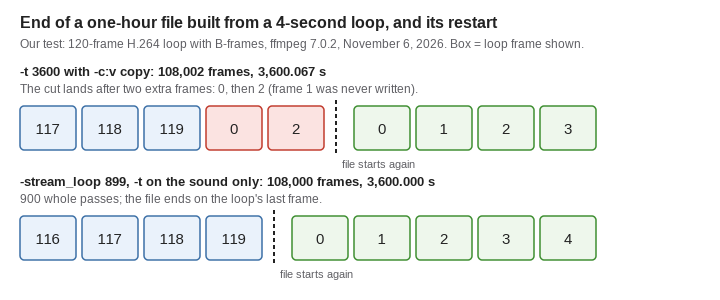
| Command | Frames | Picture length | 900 joins inside the file | End of the file |
|---|---|---|---|---|
-stream_loop -1 on both inputs, -t 3600 on the output | 108,002 | 3,600.067 s | All clean | Two stray frames: loop frame 0, then 2; frame 0 shows twice at every restart and frame 1 is skipped |
-stream_loop 899 on the picture, -t 3600 on the sound input | 108,000 | 3,600.000 s | All clean | Ends on loop frame 119; restarts with no break |
The cause is the copy. With -c:v copy, ffmpeg cuts in the order frames are stored, not the order they are shown, so the cut took frame 2 (stored early because frame 1 is a B-frame that depends on it) and left frame 1 out. The same 60-second build from a copy of the loop made without B-frames (-bf 0) ended on exactly 1,800 frames, and with B-frames on 1,802. With our mono test tone the hour took about four minutes on our server either way, nearly all of it encoding the sound (a stereo noise track took 75 seconds); copying the 900 passes of picture alone took under a second.
Two stray frames are a small skip, and on a one-off upload they only show at the very end. On a 24/7 stream the file restarts every hour, so it is 24 skips a day (our arithmetic), the same kind of fault this guide removes from the short loop. The whole-pass command avoids it with no extra encoding. The sound loop does not have to fit the hour: its join falls wherever it falls, and only the file's end needs both to stop together.
Before you put the loop on air
- The last frame leads into the first and is not a copy of it; the frame count is what you expect.
- An animation runs at 10, 15 or 30 fps for a 30 fps stream.
- A crossfade was made from a static shot; a ping-pong has its turnaround frames trimmed and no reversed sound.
- The sound is crossfaded or cut on the bar, and kept uncompressed until the final encode.
- In a two-pass file, YDIF at the join is in line with its neighbours.
- You watched and listened to the seconds around the join on headphones.
- The file on air is long enough that the repeat is not obvious.
- A long file is a whole number of loop passes (
-stream_loopcount), not a copied loop cut with-t, and its frame count is passes times the loop's frames.
FAQ
How do I make a seamless looping video that doesn't jump?
Make the end of the file lead into its start: animate a cycle, crossfade the last seconds into the first, or play the clip forward and back. Then check the join in a file with two passes of the loop, so you see the real seam rather than your player restarting.
Why does my loop stutter at the restart even though the frames match?
Usually the last frame is a copy of the first, so the same picture shows twice. Drop the last frame. In a ping-pong loop, drop the first and last frame of the reversed half.
How do I loop a video back and forth?
Join the clip with a reversed copy of itself. The ffmpeg command in this guide does it with the reverse, trim and concat filters and removes the two repeated turnaround frames.
Why is there a click or gap when my audio loops?
A click comes from cutting the sound at a point where the waveform does not meet its start; crossfade it or cut on the bar. A short gap can come from copying an AAC file end to end; repeat the uncompressed sound and encode once.
Why does my 10-hour loop video skip when it restarts?
If it was built by repeating a loop with -c copy and cutting it with -t, the cut usually lands part way through a group of frames, and the file ends on a frame or two from the next pass. Repeat the loop a whole number of times with a -stream_loop count and cut only the sound with -t. In our one-hour test that gave exactly 108,000 frames instead of 108,002.
What frame rate should a lofi loop animation use?
One that divides evenly into the stream's rate. For a 30 fps stream, 10, 15 or 30 fps. A 12 fps animation converted to 30 fps holds drawings for uneven lengths.
Sources
- ffmpeg documentation: filters (xfade, acrossfade, reverse, trim, fps, signalstats, metadata) and ffmpeg tool (-stream_loop).
- Krita manual: Introduction to animation.
- YouTube Help: upload videos longer than 15 minutes.
- All commands tested on our server with ffmpeg 7.0.2, on generated test clips (drifting stripes, a periodic animation and a 220 Hz tone); the long-file and seam check tests. Nothing was uploaded to YouTube or Loopcast.
- Loopcast: YouTube page and pricing.