

Short answer
- Film through clean glass in a dark room: tripod not touching the tank stand, lens square to the glass, room lights off, manual focus, exposure and white balance locked.
- Pick one sound and say it in the title: filter hum, bubbling, licensed music, or silent. A silent version suits classrooms.
- "For babies" changes the settings. A video aimed at children has to be set as made for kids, which turns off comments, personalized ads and "Save to playlist and Save to watch later". The WHO says that for infants under 1, "Screen time is not recommended."
- No cut point hides the seam when fish swim through it. In our test no loop length came below 10.7 times a normal frame change, so film a long take: a 20-minute loop has 3 seams an hour, a 40-second loop 90.
- Do not promise "no ads". YouTube's terms give it "the right to monetize your Content on the Service".
- This guide is about recorded tanks. For a live camera on your aquarium, see our guide to live streaming a bird feeder or aquarium.
From YouTube Help, the YouTube Terms of Service, the World Health Organization and Loopcast, commands tested on our server.
1. What people look for in an aquarium video
The searches split by where the video plays and who watches it: "aquarium tv screensaver", "aquarium video for cats", "aquarium video for babies", "aquarium video for classroom" and "aquarium video no ads". Each one asks for something slightly different.
| Type | Where it plays | Sound | Watch out for |
|---|---|---|---|
| Aquarium TV or screensaver | A living room TV for hours | Bubbling or filter hum, low | A visible loop seam; reflections of the room in the glass |
| For cats | A TV or tablet a cat can reach | Often silent or very quiet | Claims about pets you cannot back up (section 6) |
| For babies | A nursery or family room | Soft music or water sound | Made for kids settings and screen time advice (section 7) |
| For classroom | A projector during quiet work | Silent, or quiet water | Ads between segments; text or logos that distract |
| Live aquarium cam | Your channel's Live tab | The tank's own sound | A different job: see our live cam guide |
A recording has one big advantage over a live camera: you only show the tank at its best. Clean glass, fish in view, no feeding mess, no dark hours when the tank light switches off.
2. Film a fish tank well
Glass, water and moving fish make an aquarium harder to film than it looks. Most problems come from three things: reflections, automatic settings and a dirty tank.
- Clean first, film later. Wipe the front glass inside and out, remove algae, and trim anything floating. Do the cleaning a day before, so stirred-up particles settle and the water is clear on camera.
- Kill the reflections. Turn off room lights and screens, close the curtains if the window faces the tank, and wear dark clothes. Put the lens close to the glass and square to it: at an angle the glass shows the room. A rubber lens hood pressed against the glass blocks the rest.
- Use the tank's own light. The aquarium light from above is the only light you want. If the picture shows rolling bands, the LED light is flickering against your shutter; try another shutter speed until the bands go.
- Lock the camera. A tripod on the floor, not touching the tank stand, which carries the filter and pump vibration. Turn off image stabilisation on a tripod.
- Manual focus, set on the middle of the tank. Autofocus jumps between the glass, bubbles and passing fish.
- Exposure and white balance: manual or locked. A fish swimming past fills the frame with colour, and on automatic the whole picture shifts with it. Set white balance once, under the tank light, and keep it for the take.
- Frame rate: 25 or 30 fps is plenty for fish, or 50 or 60 if you want smoother motion. Keep it the same from camera to upload; YouTube's advice is that "Content should be encoded and uploaded in the same frame rate it was recorded."
- Long take: record 30 to 60 minutes and leave the room. Fish come out once nobody is moving near the glass. Do not feed during the take, or flakes drift through every frame.
3. Sound: filter hum, bubbling or music
Decide the sound before you film, because it decides how you record. These are the usual choices, and the title should say which one the video has.
- Filter hum. Real and steady, but a hum can sound like a fault on TV speakers. Record it close and cut the low rumble with a high-pass filter.
- Bubbling. An air stone or a waterfall filter gives the sound most people expect from "aquarium sounds". Record it close with the room quiet; the camera's own mic picks up fridges and traffic.
- Music. Only music you are licensed for, on YouTube and, if the video goes into a 24/7 stream, for that too. Our guide to music licences for 24/7 streams compares the terms.
- Silent. Many classroom and "for cats" viewers want no sound at all. Say "no sound" in the title.
To put the tank sound under music, this mixes the two, cuts rumble below 80 Hz on the tank track, and sets the levels (0.6 for the tank, 0.4 for the music; change them to taste):
ffmpeg -i tank.wav -i music.wav -filter_complex \
  "[0:a]highpass=f=80,volume=0.6[t];[1:a]volume=0.4[m];[t][m]amix=inputs=2:duration=shortest:normalize=0" \
  -c:a aac -b:a 192k mix.m4a
duration=shortest ends the mix with the shorter file, and normalize=0 keeps the levels you set instead of letting ffmpeg turn both down.
4. A seamless loop and a long file
An aquarium loop has one problem a fireplace or a landscape does not: fish swim through the seam. A crossfade across a moving fish shows two half-transparent fish for a second. Pick the quietest moment for the cut, with the fewest fish close to the glass, and keep the fade short there; our test below shows why a long take matters more than the exact cut point. The crossfade itself is the tested xfade command in our ambient video guide, and the same guide repeats the loop to 10 hours with -stream_loop. Our fireplace video guide shows how to loop the sound separately, at a different length from the picture.
For a classroom or "no sound" version, take the same command and drop the audio with -an. This makes a 3-hour silent file (10,800 seconds) without re-encoding:
ffmpeg -stream_loop 539 -i tank-loop.mp4 -an -c copy -movflags +faststart aquarium-silent-3h.mp4-stream_loop 539 is for a 20-second loop: the first pass plus 539 repeats is 540 passes, exactly 10,800 seconds. For your loop, divide 10,800 by its length in seconds and subtract one. Until November 7 this command said -stream_loop -1 with -t 10800. With a copied picture that cut lands part way through a group of frames: on a 300-second test with a 10-second loop it gave 9,002 frames and 300.067 seconds, ending on frame 0 and then frame 3 of the next pass, so the file jumps when it restarts. A set number of passes gave 9,000 frames, 300.000 seconds, and ended on the loop's last frame. Our seamless loop guide has the full test.
Make several lengths if your audience differs: a short one for a lesson, a long one for the TV. YouTube's upload limit is "256 GB or 12 hours, whichever is less".
What we tested: on our server with ffmpeg 7.0.2, the mix command on a 20-second generated noise file and a 25-second tone gave a 20-second stereo AAC file at 48 kHz. The earlier silent command (-stream_loop -1), run with -t 300 to keep the test small, turned a 20-second 1080p H.264 test loop into a 5-minute file with no audio track, index at the start, and a last 10 seconds that decoded without errors; the same command without -an kept the AAC track. We did not run the full 3 hours, and we did not upload either file to YouTube. Test files were deleted afterwards.
Can you hide the seam by picking the right cut point? Our test
For fire, rain or moving water, a short script can usually find a frame late in the clip that looks almost like the first one, and cutting there hides the seam. We wanted to know whether that works for fish. We generated two 40-second 720p test tanks: six fish swimming at their own speeds with rising bubbles, and a control clip where every fish and bubble repeats exactly every 20 seconds. Then we checked every possible loop length between 10 and 40 seconds. A score of 1x means the jump at the loop point looks like a normal step from one frame to the next.
| Loop made from | Jump at the loop point | What a viewer sees |
|---|---|---|
| Free-swimming fish, whole 40 s clip | 12.4x | Every fish jumps to a new place |
| Free-swimming fish, best cut the script found (38.9 s) | 10.7x | Still a jump: no cut between 10 and 40 s came below 10.7x (worst 15.0x) |
| Free-swimming fish, 1-second crossfade at the cut | No jump | 4 to 6 of the 6 fish show twice, half see-through, at every cut point we tried |
| First 20 s forward, then backwards | 1.2x | No jump, but for half the loop every fish swims backwards and the bubbles sink |
| Control: fish on a 20 s cycle | 1.1x | The script found 20.000 s; looped three times, the joins measured like normal frames |
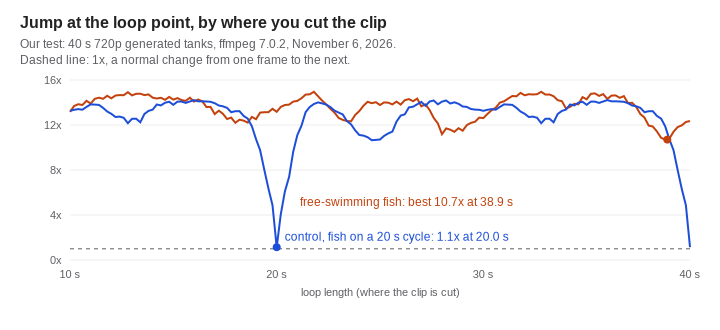
What this means for a real tank: fish never come back to the same places at the same moment, so no cut point hides the seam, and the best one was only a little better than cutting at the end. The background matches, the fish do not. A crossfade removes the jump but shows ghost fish, wherever you put it. So the useful thing is how often the seam comes round (our arithmetic): a 40-second loop has 90 seams an hour, a 5-minute loop 12, and a 20-minute loop 3. Film a long take and put one crossfade in the quietest moment you can find. A tank with few fish, or shrimp and plants with little movement, is where a cut point can come close, and the script tells you.
The script reads a small grey copy of the clip, measures the normal change between frames, and lists the loop length whose next frame matches the first frame best:
#!/usr/bin/env python3
# loopfind.py: find where to end a clip so it loops without a jump.
# usage: python3 loopfind.py tank.mp4 [shortest_loop_seconds]
import sys, subprocess, numpy as np
src = sys.argv[1]; min_s = float(sys.argv[2]) if len(sys.argv) > 2 else 10
w, h = 160, 90
fps = subprocess.run(['ffprobe', '-v', 'error', '-select_streams', 'v:0',
    '-show_entries', 'stream=r_frame_rate', '-of', 'csv=p=0', src],
    capture_output=True, text=True).stdout.strip()
n, d = fps.split('/'); fps = int(n) / int(d)
raw = subprocess.run(['ffmpeg', '-v', 'error', '-i', src, '-vf', f'scale={w}:{h}',
    '-pix_fmt', 'gray', '-f', 'rawvideo', '-'], capture_output=True).stdout
f = np.frombuffer(raw, np.uint8).reshape(-1, h, w).astype(np.int16)
normal = np.median(np.abs(np.diff(f, axis=0)).mean(axis=(1, 2)))
# keeping frames 0..n-1 is seamless when frame n would look like frame 0
seam = np.abs(f - f[0]).mean(axis=(1, 2))
first = int(min_s * fps)
n = first + int(np.argmin(seam[first:]))
jump = lambda k: np.abs(f[k - 1] - f[0]).mean()
print(f'normal change from one frame to the next: {normal:.2f}')
print(f'loop the whole clip ({len(f)/fps:.3f} s): jump {jump(len(f)):.2f} = {jump(len(f))/normal:.1f}x normal')
print(f'best loop: keep the first {n/fps:.3f} s (-frames:v {n}): jump {jump(n):.2f} = {jump(n)/normal:.1f}x normal')
It needs Python 3 with numpy, and ffmpeg. On our free-swimming tank it printed 12.4x for the whole clip and 10.7x for the best loop (1,167 frames). If the best loop is close to 1x, cut there and loop the result. The -g 30 puts a keyframe every second at 30 fps:
ffmpeg -i tank.mp4 -frames:v 600 -c:v libx264 -crf 18 -g 30 -pix_fmt yuv420p tank-loop.mp4What we tested: the script on all three clips (1.6 seconds for a 40-second clip), and the cut command on the control clip: 600 frames, looped three times with -stream_loop 2 -c copy into 1,800 frames, where both joins changed by 0.39 against a normal 0.34. The forward-then-backwards loop is the ping-pong loop from our seamless loop guide, with the turnaround frames trimmed. We did not test on real tank footage or upload these files.
5. Aquarium TV and screensaver videos
For a video that runs on a TV all evening, length and calm matter more than anything else.
- Longer loops hide better. A 10-second cycle is obvious after a few minutes; a loop of several minutes, made from more than one calm stretch, is not.
- No text on screen. A channel logo or a title in the corner stays on the TV for hours. Put the information in the title and description instead.
- 4K only if you filmed in 4K. Our ambient video guide covers 4K, 60 fps and file sizes.
- Different tanks, not copies. A reef tank, a planted tank, a single betta, a pond at dusk: each is a new video (section 8).
6. Aquarium videos for cats
"For cats" is a title, not a promise. We found no primary source showing that aquarium videos are good for cats, so we make no claim either way, and a video should not claim that it calms, entertains or is healthy for pets unless the creator can point to evidence.
What can be said plainly is practical: keep the camera close so fish are large in the frame, keep the sound off or low, and tell viewers in the description that the video is a recording of a real tank. If a cat paws at the screen, a TV or tablet that is not fixed in place can fall, so the owner should watch the first session.
A video for cats is made for an adult audience that owns cats, so it is usually not "made for kids". YouTube says a video is not made for kids just because "Children may incidentally see it" or because "It’s safe or appropriate for everyone to watch (aka it’s “family friendly”)."
7. Aquarium videos for babies: made for kids and screen time
A video titled or described "for babies" points at children as the audience, and that is one of the factors YouTube lists: "Whether children are your intended audience (e.g. as indicated in your video metadata) or the actual audience for the video." YouTube requires every creator to set this: "Regardless of your location, we require you to tell us whether or not your videos are made for kids according to an agreement with the US Federal Trade Commission (FTC) and to help you comply with the Children’s Online Privacy Protection Act (COPPA)". It also says: "we cannot provide legal advice." If you are unsure, take legal advice.
Setting a video as made for kids changes what it can do. YouTube says it does not "serve personalized ads on kids content", and lists features that "won’t be available on individual videos or live streams", among them:
- "Comments"
- "Personalized advertising"
- "Save to playlist and Save to watch later"
- "Playback in the Miniplayer"
- "Notification bell"
- "Live chat or live chat donations"
- "Cards or end screens"
For a long aquarium video, the loss of "Save to watch later" and end screens matters as much as the comments: parents cannot save it for bedtime, and you cannot point to your other tanks at the end. YouTube adds that "Not serving personalized ads on kids content may result in a decrease in revenue". And "Videos that you set as “made for kids” are more likely to be recommended alongside other kids’ videos."
The audience question is not only YouTube's. The World Health Organization's guidelines for children under 5 say infants under 1 year should "Not be restrained for more than 1 hour at a time" and that "Screen time is not recommended." For 1-year-olds, "sedentary screen time (such as watching TV or videos, playing computer games) is not recommended." A creator cannot change what parents do, but should not title or describe an aquarium video as good for a baby's development, sleep or health. The WHO's advice runs the other way.
8. No ads, classrooms and YouTube's repetitive content rules
"No ads" is not yours to promise. YouTube's Terms of Service say: "You grant to YouTube the right to monetize your Content on the Service (and such monetization may include displaying ads on or within Content or charging users a fee for access)." The terms say "your Content", not only Partner Program videos, and "This Agreement does not entitle you to any payments." So a title that says "no ads" may be wrong for some viewers. Say what you control instead, such as "no music", "no text" or "no talking".
For classrooms, a teacher wants a quiet, plain video that runs for a lesson: a silent or soft version, no logos, no sudden changes, and a length that fits. A classroom video is still general audience unless it is aimed at children; content set as made for kids loses the features listed in section 7.
Repetitive content. An aquarium channel lives or dies on variety. YouTube's monetization policies say "channels where content feels interchangeable from video to video are not allowed to monetize", naming "Similar or repetitive content with low educational value, commentary, narratives, or minimal variation across videos". Ten uploads of the same tank at different lengths are that. Different tanks, species, a tank through the seasons, or a feeding time with a short note on the fish are not.
Reused content. A stock aquarium clip on a loop is content "already on YouTube or another online source" unless you add "substantive modifications", and "Our reused content policy applies to your channel as a whole". Filming your own tank, or a public aquarium where filming is allowed, avoids it. Our guide to inauthentic content and 24/7 channels goes through the wording.
9. Uploads or a 24/7 looped stream?
A recorded tank can go on YouTube as a normal upload, as a looped stream that never ends, or both. A live camera on a real tank is a third option, covered in our live cam guide.
| Option | What viewers get | Limits | Effort and cost |
|---|---|---|---|
| Long upload (1 to 12 hours) | A video found in search, ready on any TV, any time | "256 GB or 12 hours, whichever is less" | One upload; no running cost |
| Short silent upload | A lesson-length video for classrooms | Same as above | Minutes to make from the same loop with -an |
| 24/7 looped stream | A tank that is always on in the Live tab, with live chat if not made for kids | A stream over 12 hours "may not be captured at all", so it leaves no video behind | A PC left on, a server, or a hosted loop: on Loopcast $0.72 a day, which Loopcast puts at $21.60 over 30 days |
| Live camera on your tank | The real tank, as it is right now | Dark when the tank light is off; needs upload bandwidth all day | Camera, relay box and connection; see our live cam guide |
The two recorded options work together: a looped stream can link to the long uploads in its description. Say in the stream title or description that it is a recorded tank on a loop, so nobody thinks it is live. For whether a looped stream is allowed and its limits, Loopcast's YouTube page sets them out.
Before you film and publish
- The glass is clean inside and out, and the tank was cleaned a day before filming.
- Room lights are off, nothing reflects in the glass, and the tripod does not touch the tank stand.
- Focus, exposure and white balance are manual and do not change during the take.
- The loop is minutes long, made from one long take, with a single short crossfade at the quietest moment. loopfind.py was run on it first.
- The title says what the sound is: filter, bubbles, music or none. Any music is licensed.
- The audience setting is right: "for babies" content is set as made for kids.
- No title or description claims the video is good for pets or babies, or promises no ads.
- Each video is a different tank, species or scene, filmed by you.
- A looped stream says it is a recording.
FAQ
Is there an aquarium video with no ads?
No creator can guarantee it. YouTube's Terms of Service give YouTube "the right to monetize your Content on the Service", which may include ads. A creator can promise what is in the video, such as no music or no text, but not what YouTube shows around it.
Do I have to set an aquarium video for babies as made for kids?
If babies or children are the intended audience, as a "for babies" title says, YouTube's factors point to made for kids. That turns off comments, personalized ads, saving to playlists and the Miniplayer, among other features. YouTube says it cannot give legal advice, so check with a lawyer if you are unsure.
Are aquarium videos good for cats?
We found no primary source that says so, and we do not claim it. If you make one, describe it as a recording of a fish tank and leave out health or calming claims.
How do I film a fish tank without reflections?
Turn off the room lights, keep the lens close and square to the glass, wear dark clothes, and use a rubber lens hood against the glass. Light the scene only with the tank's own light.
Is this the same as a live aquarium cam?
No. This guide is about recorded and looped videos. For a camera streaming your tank live, see our guide to live streaming a bird feeder or aquarium on YouTube.
How do I make a fish tank video loop without a jump?
Fish never return to the same places at the same moment, so a hard cut always shows a jump and a crossfade shows ghost fish. In our test no cut point between 10 and 40 seconds came below 10.7 times a normal frame change. Film a long take, use one short crossfade at the quietest moment, and make the loop minutes long so the seam comes round rarely.
Sources
- YouTube Help: Determining if your content is "made for kids" and Set your channel or video’s audience.
- YouTube: Terms of Service, Right to Monetize.
- World Health Organization: To grow up healthy, children need to sit less and play more (April 24, 2019).
- YouTube Help: YouTube channel monetization policies, recommended upload encoding settings, uploading videos longer than 15 minutes and archive live streams.
- Mix and silent long-file commands tested on our server with ffmpeg 7.0.2, and the loop point test (loopfind.py, cut and loop commands) on November 6, 2026, on generated test files.
- Loopcast: YouTube page and pricing.