

Short answer
- Use an IP camera with RTSP and H.264. A small computer or server then relays the camera's video to YouTube without re-encoding it.
- Add a silent audio track if the camera has no microphone. The ffmpeg command below does both, and we tested its shape on a test clip.
- Budget upload bandwidth. YouTube's minimum for 1080p at 30 fps in H.264 is 5 Mbps, which is about 54 GB a day around the clock.
- Restart automatically, with a timeout. A loop script or a systemd service brings the relay back after a camera or Wi-Fi drop, but only if ffmpeg exits. In our test a frozen camera left ffmpeg waiting for over 10 minutes;
-timeout 5000000made it exit and the loop reconnect. - A 24/7 stream has no full replay: YouTube says streams over 12 hours "may not be captured at all". Keep neighbours, faces, voices and house numbers out of shot.
From YouTube Help, the ffmpeg docs and Loopcast; commands tested on our server with a simulated camera.
1. Choose the camera and the box that sends it
A live cam has three parts: the camera, something that turns its picture into a stream YouTube accepts, and an internet connection that never sleeps. There are three common ways to put them together.
| Setup | Good for | Watch out for |
|---|---|---|
| IP camera (RTSP, H.264) plus a relay on a small PC or server | Outdoor feeders, weatherproof housings, night vision, the camera far from the computer | Pick a camera that offers an RTSP stream; some only work with their own app or cloud |
| USB webcam plus a mini PC or Raspberry Pi | Aquariums and indoor scenes close to a computer | The computer has to encode the video itself, all day. Check it can do your resolution in real time before you buy |
| An old phone with a streaming app | Trying the idea for a weekend | Heat, battery swelling and sleep settings make it a poor choice for weeks of uptime |
For a stream that should run for months, we would pick the first. The camera already compresses its video to H.264, so the relay only copies it and adds sound. That is light work: an old laptop, a mini PC or a rented server can do it, and the camera can sit on a pole by the feeder with only a network cable or Wi-Fi to reach.
All three assume a camera that stays in one place. A camera that travels, filming a train ride or a ferry crossing from start to finish, is a different format with its own filming permissions; our guide to slow TV channels covers it.
Before you start, live streaming has to be switched on for the channel. YouTube's getting-started page says you need to verify your channel and have had no live streaming restrictions in the past 90 days.
2. Set up the camera for YouTube
Most IP cameras have a main stream and a lower-quality sub stream. Use the main stream and set it in the camera's own settings page:
- Codec: H.264. YouTube's encoder spec also lists H.265 and AV1. Our ffmpeg 7.0.2 did copy an H.265 test stream into the FLV container YouTube's RTMP ingest uses, but we could not test whether YouTube accepts it from a relay, so H.264 is the safe choice.
- Keyframe (I-frame) interval: 2 seconds. YouTube's spec says "Recommended 2 seconds" and "Do not exceed 4 seconds". On a camera at 25 fps that is an I-frame interval of 50.
- Constant bitrate if the camera offers it, since YouTube's spec asks for CBR.
- Bitrate: at least YouTube's minimum for your resolution, from the table below.
| Resolution | Minimum | Recommended | Data per day at the minimum | Per 30 days |
|---|---|---|---|---|
| 720p at 30 fps | 3 Mbps | 8 Mbps | 32 GB | about 0.97 TB |
| 1080p at 30 fps | 5 Mbps | 14 Mbps | 54 GB | about 1.6 TB |
| 1080p at 60 fps | 6 Mbps | 17 Mbps | 65 GB | about 1.9 TB |
Those numbers decide most home setups. A bird feeder does not need 60 fps, and 720p or 1080p at 25 or 30 fps looks fine for birds and fish. Your upload speed needs headroom above the bitrate, and YouTube's advice is direct: "We recommend running a speed test to test your upload bitrate." Check your internet plan for a data cap, too; a month of 1080p is well over a terabyte.
Check what the camera really sends
A camera's settings page does not always match what it sends: the keyframe interval may be set in frames rather than seconds, and a "bitrate" field may be a ceiling that a quiet scene never reaches. This script reads 30 seconds of the camera with ffprobe, which comes with ffmpeg, and compares it with YouTube's H.264 settings: codec, the longest gap between keyframes, and the average bitrate against YouTube's minimum for that resolution.
#!/bin/bash
# camcheck.sh "rtsp://user:password@192.168.1.50:554/stream1"
# Reads 30 seconds of the camera and compares it with YouTube's H.264 encoder settings.
URL="$1"; SECS=30
eval "$(ffprobe -v error -rtsp_transport tcp -timeout 5000000 -select_streams v:0 \
  -show_entries stream=codec_name,width,height,avg_frame_rate -of default=nw=1 "$URL")"
[ -z "$codec_name" ] && { echo "no video stream found"; exit 1; }
fps=$(echo "$avg_frame_rate" | awk -F/ '{ if ($2>0) printf "%.0f", $1/$2; else print 0 }')
echo "video: $codec_name ${width}x${height} at $fps fps"
[ "$codec_name" != h264 ] && echo "CHECK: not H.264; set the camera to H.264 for the copy relay"
ffprobe -v error -rtsp_transport tcp -timeout 5000000 -select_streams v:0 \
  -read_intervals "%+$SECS" -show_entries packet=pts_time,size,flags -of csv=p=0 "$URL" |
awk -F, -v h="$height" -v fps="$fps" '
  { if ($1=="" || $1=="N/A") next; n++; bytes+=$2; if (n==1) first=$1; last=$1
    if ($3 ~ /K/) { if (k!="") { gap=$1-k; if (gap>maxgap) maxgap=gap }; k=$1; keys++ } }
  END { span=last-first; if (span<=0) { print "no video read"; exit 1 }
    mbps=bytes*8/span/1e6
    # YouTube H.264 minimums: 720p 3, 1080p30 5, 1080p60 6 Mbps
    min=0; if (h>=1080) min=(fps>30?6:5); else if (h>=720) min=3
    printf "keyframes: %d in %.1f s, longest gap %.2f s\n", keys, span, maxgap
    printf "average bitrate: %.2f Mbps (YouTube minimum for this size: %s Mbps)\n", mbps, min
    if (keys<2) print "CHECK: fewer than 2 keyframes in the sample, the gap is too long"
    else if (maxgap>4.01) print "CHECK: keyframe gap over 4 s; YouTube says do not exceed 4 seconds"
    else print "keyframe gap OK (YouTube: recommended 2 s, at most 4 s)"
    if (min>0 && mbps<min) print "CHECK: bitrate under the YouTube minimum; raise it or use constant bitrate" }'
We ran it on November 5, 2026 against four simulated cameras: 720p test streams at 25 fps served over RTSP (TCP) by the open-source mediamtx server on our machine. Each check took 31 seconds.
| Simulated camera | Codec | Longest keyframe gap | Average bitrate | Result |
|---|---|---|---|---|
| Keyframe every 50 frames, constant 3.5 Mbps | H.264 | 2.00 s | 3.49 Mbps | Passes every check |
| Keyframe every 50 frames, 2.5 Mbps | H.264 | 2.00 s | 2.50 Mbps | Bitrate under the minimum |
| Keyframe every 250 frames, 2.5 Mbps | H.264 | 10.00 s | 2.49 Mbps | Keyframe gap over 4 s, bitrate under the minimum |
| H.265, keyframe every 50 frames, 2 Mbps | H.265 | 2.00 s | 2.03 Mbps | Not H.264, bitrate under the minimum |
The third row is the trap to look for: an interval of 250 frames reads like a sensible number on a settings page, but at 25 fps it is a keyframe every 10 seconds, more than twice YouTube's limit. A wrong RTSP address ends the script with "no video stream found" instead of hanging. Our test streams were busy pictures; a real camera on variable bitrate filming a still feeder will average less than its setting, which is why the script measures instead of trusting the settings page.
3. Relay the camera to YouTube with ffmpeg
This command reads the camera's RTSP stream, copies the H.264 video as it is, adds a silent stereo track and sends both to YouTube's RTMP ingest. Replace the camera address and the stream key with yours (the address format differs by camera maker; it is in the camera's manual):
ffmpeg -rtsp_transport tcp -timeout 5000000 -i "rtsp://user:password@192.168.1.50:554/stream1" \
  -f lavfi -i anullsrc=channel_layout=stereo:sample_rate=44100 \
  -map 0:v:0 -map 1:a:0 -c:v copy -c:a aac -b:a 128k -shortest \
  -f flv "rtmp://a.rtmp.youtube.com/live2/YOUR-STREAM-KEY"
-rtsp_transport tcpasks the camera for RTSP over TCP, which copes better with Wi-Fi than the default UDP.-timeout 5000000makes ffmpeg give up when the camera sends nothing for 5 seconds (the value is in microseconds; the ffmpeg docs: "Set socket TCP I/O timeout in microseconds."). Without it, a frozen camera can leave the relay waiting with nothing to send, and the restart loop below never runs. Our test shows the difference.-c:v copysends the camera's video untouched, so the relay uses almost no CPU. It only works if the camera sends H.264.anullsrcmakes the silent track. YouTube's encoder spec lists an audio codec ("AAC or MP3") and 128 Kbps for stereo, and a silent track keeps the stream in that shape when the camera has no microphone.- If your camera has a microphone you want to use, swap
-map 1:a:0for-map 0:a:0and drop theanullsrcline.
What we tested and what we did not: we ran this command (then without -timeout) on our server with ffmpeg 7.0.2, with a 720p H.264 test clip (no audio) standing in for the camera, read in real time, and a local FLV file in place of YouTube. The output had the video copied as H.264 and a silent AAC stereo track at 44.1 kHz, as intended. We did not have a real camera or send to a real YouTube stream key, so test with your own camera before you leave it running. YouTube's own advice applies: "Tests should include audio and movement in the video similar to what you'll be doing in the stream."
A USB webcam cannot use -c:v copy in most cases, because the computer has to encode the picture. That is the case where OBS (below) is the easier tool.
4. Keep it running for weeks
The relay will stop sometimes: the camera reboots, the Wi-Fi drops, the router updates overnight. The fix is to start it again automatically. The simplest version is a shell script that restarts ffmpeg ten seconds after it exits:
#!/bin/bash
while true; do
  ffmpeg -rtsp_transport tcp -timeout 5000000 -i "rtsp://user:password@192.168.1.50:554/stream1" \
    -f lavfi -i anullsrc=channel_layout=stereo:sample_rate=44100 \
    -map 0:v:0 -map 1:a:0 -c:v copy -c:a aac -b:a 128k -shortest \
    -f flv "rtmp://a.rtmp.youtube.com/live2/YOUR-STREAM-KEY"
  echo "$(date '+%F %T') ffmpeg stopped, restarting in 10 s"
  sleep 10
done
We tested the loop with the same test clip in place of the camera: each time the clip ended, ffmpeg exited and the script started it again ten seconds later. On a Linux box, a systemd service does the same job and also starts the relay after a reboot. Save the loop above as /usr/local/bin/feeder-cam.sh, make it executable, and add a unit like this (we did not install this one on our server):
[Unit]
Description=Bird feeder cam relay to YouTube
After=network-online.target
Wants=network-online.target

[Service]
ExecStart=/usr/local/bin/feeder-cam.sh
Restart=always
RestartSec=10

[Install]
WantedBy=multi-user.target
The loop only helps if ffmpeg actually exits when its input is gone. A camera relay does, but a relay that pairs a still picture with a live audio feed can keep sending the picture with no sound; our radio station relay test shows the case and the -shortest fix.
When the camera freezes instead of dropping
Our first version of this guide, like most relay examples, had no -timeout. We tested what that does when a camera fails in two different ways. We served a 720p H.264 test stream over RTSP from mediamtx, relayed it with the command above to a local file, and after 20 seconds either killed the server, as a camera that reboots or loses power would close its connection, or paused it, so the connection stayed open but nothing arrived, as with a camera whose software hangs or a Wi-Fi link that goes quiet.
| Camera failure | Relay without -timeout | With -timeout 5000000 (5 s) | With -timeout 10000000 (10 s) |
|---|---|---|---|
| Connection closed (camera killed) | Exits within 0.5 s | Exits within 0.5 s | Exits within 0.5 s |
| Connection open, no data (camera frozen) | Still waiting after 10 minutes, sending nothing | Exits after 10.5 s | Exits after 20.5 s |
Two findings. Without a timeout, the frozen case never ended in our test: after 10 minutes ffmpeg was still running, its output had not grown since the freeze, and a restart loop around it would have waited forever, because the loop only acts when ffmpeg exits. With a timeout, ffmpeg exited after about twice the value we set (10.5 s for 5 s, 20.5 s for 10 s), so plan for double. We then ran the full restart loop with a 5 second timeout and froze the camera for 60 seconds:
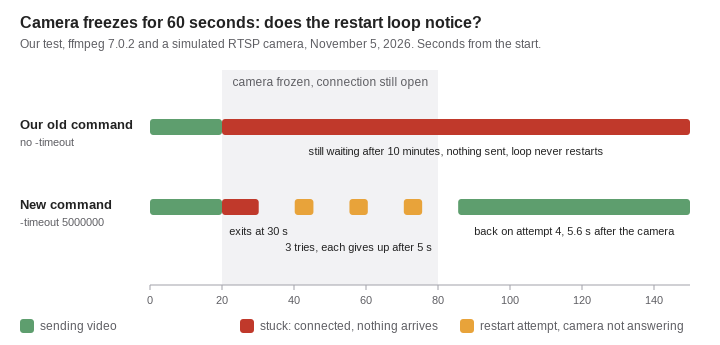
The relay exited 10 seconds into the freeze, the loop tried again every 15 seconds (10 seconds of sleep, then 5 seconds before the timeout gave up on the silent camera), and the stream was back 5.6 seconds after the camera returned. The timeout matters a second time here: each restart attempt against the frozen camera also gave up after 5 seconds instead of waiting. The worst case with these numbers is about 15 seconds from the camera's return to a running relay. We tested with a simulated camera, not a real one; a real camera or router may close a dead connection on its own at some point, but the timeout means you do not have to rely on it.
Beyond software, three things decide uptime:
- Power. A PoE camera (power over the network cable) and a small UPS on the router and relay box ride out short cuts. Set the computer's BIOS to power on after a power loss.
- Network. A cable beats Wi-Fi. If the camera must use Wi-Fi, put the access point close and give the camera a fixed IP address so the RTSP address never changes.
- Weather and heat. Outdoor cameras need a weatherproof rating and shade; an aquarium camera needs to be clear of splashes and lid condensation.
5. Or use OBS
OBS is the easier route if you want overlays, such as a species list, the local time or a donation link, or if your camera is a USB webcam. Add the camera as a Media Source, untick the local file option and paste the RTSP address as the input, or add a USB camera as a Video Capture Device. The cost is that OBS re-encodes everything, so the computer works harder, and OBS has no built-in restart if it crashes. For a plain view of a feeder, the ffmpeg relay is lighter.
6. The YouTube rules a 24/7 camera runs into
No full replay. YouTube's archive page says: "If your stream exceeds 12 hours, it may not be captured at all." A camera that streams for weeks will not leave a recording on the channel. YouTube's advice: "We recommend recording a local archive as a backup." Save the good moments, a hawk at the feeder or fry hatching, as clips while the stream is live or from a local recording. Our guide to live stream time limits explains the archive rule and tests a way to record the stream in hour-long files.
Privacy. YouTube's privacy guidelines protect a person's image, which "refers to images, audio, video footage, or text that uniquely identify you", and contact info such as a home address. A feeder camera in a garden can pick up all of these: a neighbour's window, people walking past, a car's number plate, your house number, voices across the fence. Frame tight on the feeder or tank, check the shot in daylight and at night, and if your camera has a privacy mask setting, black out anything outside your own property. When someone complains about a recorded video, YouTube may let the creator "use the Trim or Blur tools in YouTube Studio to edit the video", but a live stream cannot be blurred after the fact, so the framing is your only real control.
Animals. Nature cams are well inside YouTube's rules, and the violent and graphic content policy says plainly: "We do allow content that shows animals fighting in the wild, like in a nature documentary." A predator taking a bird at the feeder is that kind of content. What the policy does not allow includes "Graphic content that features animals and intends to shock or disgust", so do not title or clip such a moment for shock, and never stage anything for the camera. On a fish tank, keep the tank healthy on camera; a stream of a neglected tank is not one you want to run.
The vertical feed. YouTube sends live streams in horizontal and vertical formats at once, and "The vertical stream is a center crop of the horizontal stream". Put the feeder or the busiest part of the tank in the middle of the frame so the vertical viewers see it too.
7. Night footage and sound
At night a bird feeder is empty, and most cameras switch to infrared, which shows the scene in black and white. That suits a garden with hedgehogs, foxes or owls. Two practical points: an IR camera behind a window sees its own lights reflected in the glass, so put it outside or turn IR off; and the camera's switch between day and night mode can briefly change the picture, which the relay passes on as it is. Fish tanks are the opposite problem: when the tank light goes off on its timer, the stream goes dark.
For sound, the choices are the camera's microphone, silence, or music. Real birdsong is the draw of many feeder streams, but the same microphone hears people talking, and voices count as personal information under YouTube's privacy rules. Music on a 24/7 stream has to be licensed for YouTube live; our guide to music licences for 24/7 streams compares the terms.
8. Off hours: loop a highlight reel instead
Some channels would rather not show a dark tank or an empty feeder all night. One option is to stop the live camera at dusk and run a looped highlight reel of the day's best visits until morning. That is a different kind of stream, a video file on repeat rather than a camera, and it should say so in the title or description, so viewers do not think they are watching live. Our 24/7 stream guide covers how looped streams work, and our guide to recorded aquarium videos covers filming a tank for a reel or a long upload.
Before you go live
- Live streaming is enabled and the channel is verified.
- The camera sends H.264, a keyframe every 2 seconds, at or above YouTube's minimum bitrate, and the check script agrees.
- Your upload speed has headroom over the bitrate, and your data cap covers a month of it.
- The relay has
-timeout, restarts on its own and starts after a reboot. Test it once by unplugging the camera for a minute. - The frame shows no neighbours, passers-by, number plates or house numbers, by day and by night.
- The microphone is off or cannot hear people, or the audio is licensed music or silence.
- You record locally or clip highlights, because a 24/7 stream has no full replay.
FAQ
How do I live stream a bird feeder on YouTube?
Point an IP camera with RTSP and H.264 at the feeder, then relay its stream to YouTube with ffmpeg or OBS on a small computer that stays on. Our tested ffmpeg command copies the video and adds a silent audio track, and a restart loop keeps it running.
How much upload speed does a 24/7 camera need?
YouTube's minimum for H.264 is 3 Mbps at 720p 30 fps and 5 Mbps at 1080p 30 fps, plus headroom. At 5 Mbps the stream sends about 54 GB a day, or about 1.6 TB in 30 days.
Does my camera need a microphone?
No. If it has none, add a silent track with ffmpeg's anullsrc, as in our command. If it has one, think about privacy first: it will pick up voices as well as birdsong.
Will YouTube keep a recording of my 24/7 aquarium stream?
Not in full. YouTube says streams over 12 hours "may not be captured at all", so record locally or clip highlights while the stream is live.
Why did my camera stream stop and not restart?
Most often the camera froze without closing the connection, so ffmpeg kept waiting and the restart loop never ran. In our test a relay without a timeout was still waiting after 10 minutes. Add -timeout 5000000 before -i: ffmpeg then exits about 10 seconds into a freeze, and the loop brings the stream back once the camera answers.
Can Loopcast stream my live camera?
No. Loopcast loops video files you upload. It fits a highlight reel for the hours when the camera shows nothing, not the live feed itself.
Sources
- YouTube Help: live encoder settings, bitrates and resolutions, archive live streams, get started with live streaming.
- YouTube Help: privacy guidelines and violent or graphic content policies.
- ffmpeg documentation: RTSP options.
- ffmpeg relay command and restart loop tested on our server (ffmpeg 7.0.2), with an H.264 test clip in place of a camera and a local file in place of YouTube. Frozen and closed camera tests, the restart loop with a timeout and the camera check script tested with ffmpeg 7.0.2 and simulated RTSP cameras served by mediamtx 1.21.3. Not tested with a real camera.
- Loopcast: YouTube page and pricing.