

Short answer
- Format: YouTube uploads stop at "256 GB or 12 hours, whichever is less", so the classic ten-hour rain video fits. A 24/7 live stream has no length limit but is not archived past 12 hours, so its hours may not count toward the Partner Program.
- Biggest risk is money, not removal. A channel of near-identical noise videos matches YouTube's own example of content that cannot monetize: "minimal variation across videos".
- You cannot protect plain noise. YouTube lists "Sound effects, soundbeds, or production loops" as ineligible for Content ID, so a copy of your rain track is hard to claim.
- Measure the loudness of generated noise. At the same ffmpeg setting, white noise measured 14 LU louder than brown in our test, and ffmpeg's noise is mono until you give each channel its own seed.
- No reliable earnings figure exists for YouTube noise channels. The best documented numbers are from Spotify podcasts in 2022 and 2023, and Spotify has since cut what noise earns.
From YouTube Help and Spotify for Artists.
Ten-hour uploads or a 24/7 live stream
Most sleep channels publish long uploads: 8, 10 or 12 hours of one sound. A smaller number run a live stream around the clock. The two behave differently on YouTube, and the difference is mostly about what counts and what can be found later.
| Question | Long upload (e.g. 10 hours) | 24/7 live stream |
|---|---|---|
| Length limit | "256 GB or 12 hours, whichever is less", for verified accounts (71673) | No published limit for the broadcast |
| Kept afterwards | Yes, it is a normal video | Under 12 hours, archived automatically; longer, it "may not be captured at all" (6247592) |
| Watch hours for the Partner Program | Count | Only if public and converted to a video afterwards (72851) |
| Repetitive content review | Applies | Applies: the policy covers "Shorts, long-form videos, and live streaming" (1311392) |
| What it costs to keep going | Nothing after the upload | A machine or a hosted service running the whole time |
| Where it is found | Search and suggestions for weeks or years | The live shelf and the channel page while it runs |
The two are not exclusive. A common pattern is a library of long uploads, each a different recording, with one live stream that plays them in rotation. The uploads collect watch hours and search traffic; the stream gives returning listeners one link that never ends. Before you plan a stream that never stops, read our guide to live stream time limits, which covers the 12-hour line in detail.
The repetitive content rule, applied to noise
A noise channel is unlikely to be removed for being a noise channel. The risk is that it is refused, or loses, the YouTube Partner Program. The monetization policy asks that content "Not be mass-produced, generic, repetitive, or manipulative", and says reviewers may focus on a channel's "Main theme" rather than every video.
Its section on generic or repetitive content describes the problem in terms that fit a sleep channel closely:
"Generic or repetitive content includes content that looks like it's made with a template, or that may feel repetitive to viewers after watching several videos in a row from the same channel."YouTube Help, channel monetization policies
Its examples of what cannot monetize include "Similar or repetitive content with low educational value, commentary, narratives, or minimal variation across videos". What is allowed is described too: "the substance of each video should be materially varied and deliver creative, educational, or other value."
For a noise channel that suggests a few practical lines. They are our reading of the policy, not YouTube's checklist:
- Each video should be a different recording, not the same file at a new length or with a new thumbnail. A thunderstorm recorded in a pine forest is a different video from heavy rain on a tin roof. An 8-hour and a 10-hour version of one rain file are not. If you add thunder, place it at random times that never bunch up, with our tested thunder script, rather than one clap on a timer.
- Say what it is. Where and how it was recorded, what equipment, whether it was mixed. That is the "other value" a viewer cannot get from the next channel.
- Do not reupload other people's sounds. The reused content section applies "even if you have permission from the original creator", and it is "not based on copyright, permission, or fair use".
- Be careful with templated AI visuals. The policy names "AI-generated content made with generic or unoriginal templates giving the impression of mass production". A recording of your own with a plain screen is safer than a new AI image on the same audio every day.
We go through every section of the policy, with the formats each one catches, in inauthentic content and 24/7 channels.
Rights: where the sound comes from
Plain noise is unusual in one way: almost nobody can claim it. YouTube's Content ID rules list, as content that is ineligible for use as a reference, "Sound effects, soundbeds, or production loops". They also say that "So-called "royalty free" production music libraries" must be routed to manual review before claiming (YouTube Help, Content ID eligibility).
That cuts both ways. Your noise is unlikely to be claimed by someone else, but you also have no automatic way to stop copies of it. And because a downloaded rain track can sit on hundreds of channels, using one makes your channel look like the others, which is the reused content problem above. In order of how much they protect you:
- Generate it yourself. White, pink and brown noise are signals, not recordings, and you can make them on your own computer. This is yours outright.
- Record it yourself. Rain, fans, trains, a fireplace (our fireplace video guide covers recording the crackle). A portable recorder and a quiet night are enough. Recordings with a place and a story, like a coffee shop recorded with the owner's permission, make the strongest channel.
- Use sounds under an open license, with credit. Under Creative Commons Attribution 4.0 you may "reproduce and Share the Licensed Material, in whole or in part", and the license summary says that includes use "for any purpose, even commercially", as long as you give credit. Many other people may use the same file, so add something of your own.
If you add music to the sleep sounds, the music rules apply in full, along with the AI and health-claim rules in our guide to relaxing and meditation music channels. Our guide to music licenses for a 24/7 stream checks which libraries allow that.
Make a ten-hour noise video with ffmpeg
ffmpeg can generate noise and a plain background in one command, with no source files. Before the command, two things we found when we measured what it actually produces: the noise color changes the loudness far more than you would expect, and the noise comes out in mono.
Pick the color by ear, then match the loudness
ffmpeg's anoisesrc filter offers six colors: white, pink, brown, blue, violet and velvet. The difference between them is where the energy sits. We generated 60 seconds of each at the same setting and summed the energy in each octave band (an octave is a doubling of pitch, from 31.5 Hz bass up to 16 kHz hiss):
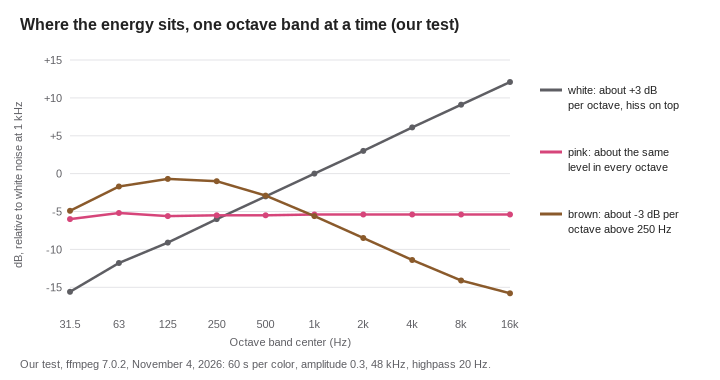
White noise puts most of its energy in the treble, which is why it sounds like hiss. Pink is the same in every octave. Brown leans on the low end, which is why it sounds like a distant rumble. ffmpeg's brown stops rising below about 250 Hz, and the highpass=f=20 in our command trims the lowest band further.
The same setting does not give the same loudness. We measured each color with ffmpeg's ebur128 filter, which reports integrated loudness in LUFS (loudness units relative to full scale; higher is louder, and 1 LU is 1 dB):
| Color | Loudness at amplitude 0.3 | Peak | Amplitude for -24 LUFS |
|---|---|---|---|
| White | -12.1 LUFS | -4.7 dBFS | 0.076 |
| Velvet | -20.3 LUFS | -6.0 dBFS | not tested |
| Violet | -21.1 LUFS | -10.5 dBFS | not tested |
| Blue | -21.6 LUFS | -11.1 dBFS | not tested |
| Pink | -25.1 LUFS | -12.5 dBFS | 0.34 |
| Brown | -26.0 LUFS | -11.1 dBFS | 0.38 |
At one setting, white noise came out 14 LU louder than brown. If you publish a white, a pink and a brown video with the same command and only the color changed, a listener who switches between them will get a much louder video at bedtime. Pick one loudness for the whole channel and set each color's amplitude to reach it. We used -24 LUFS; that is our choice for a quiet bedtime level, not a YouTube rule, so listen at the volume your audience will use before you settle on yours. To check a file of your own:
ffmpeg -nostats -i your-video.mp4 -af ebur128=peak=true -f null -In the summary at the end, the I: line is the integrated loudness and Peak: is the highest sample.
Make it stereo with two seeds
anoisesrc produces one channel: our test files came out mono. YouTube's recommended upload settings list stereo and give 384 kbps as the recommended stereo audio bitrate, against 128 kbps for mono (YouTube Help, recommended upload encoding settings). Simply converting the mono noise to two channels copies the same signal to both sides: we measured a correlation of 1.0 between left and right, so it still sounds like it comes from the middle of your head.
Two noise generators with different seed values give each ear its own noise. Ours measured a correlation of 0.001 between the channels, which is about as independent as two signals get. Two independent channels add up to a louder result: the same amplitude measured -21.0 LUFS in stereo against -24.0 LUFS as copied mono, 3 LU louder, so we lowered pink from 0.34 to 0.24 for the stereo version.
The command we tested
This makes 10 hours (36,000 seconds) of stereo pink noise over a dark 1080p screen, with a 5-second fade-in and a 10-second fade-out so it neither starts nor stops abruptly:
ffmpeg -f lavfi -i "anoisesrc=color=pink:amplitude=0.24:sample_rate=48000:seed=1" \
  -f lavfi -i "anoisesrc=color=pink:amplitude=0.24:sample_rate=48000:seed=2" \
  -f lavfi -i "color=c=0x101820:s=1920x1080:r=30" \
  -filter_complex "[0][1]join=inputs=2:channel_layout=stereo,highpass=f=20,afade=t=in:d=5,afade=t=out:st=35990:d=10[a]" \
  -map "[a]" -map 2:v -t 36000 \
  -c:v libx264 -tune stillimage -preset veryfast -g 15 -bf 0 -pix_fmt yuv420p \
-movflags +faststart -c:a aac -b:a 384k pink-noise-10h.mp4- For white or brown, change both
color=values and set the amplitude from the table above, then lower it for stereo (we multiplied by 0.7, which is the 3 dB we measured) and measure the result. -g 15follows YouTube's recommendation of a "Closed GOP. GOP of half the frame rate": a keyframe every 15 frames at 30 fps (x264 makes closed GOPs by default;-bf 0also turns off B-frames, which we kept for simplicity). On a still screen it costs little: in our 60-second test the video was 180 KB with it and 153 KB without.st=35990starts the fade-out 10 seconds before the end. If you change-t, change it to match.-movflags +faststartmoves the file index to the start of the file, so a player can begin reading it before the whole file has arrived.
What our 60-second version of this command produced, with the arithmetic for 10 hours:
| Measure | 60-second test | 10 hours (our arithmetic) |
|---|---|---|
| File size | 3.09 MB | about 1.85 GB |
| Audio stream | 382 kbps, 2 channels | most of the file |
| Video stream | 23 kbps | about 100 MB |
| Time to make it | 5.0 s | about 50 minutes |
| Loudness, steady part | -24.2 LUFS (seconds 10 to 50); -24.6 LUFS for all 60 s with the fades | -24.2 LUFS |
Almost all of the size is audio: noise is random by definition, so the audio encoder cannot compress it the way it compresses a still screen. About 1.85 GB is far below YouTube's 256 GB upload limit. The time depends on your computer; ours is a shared server, so treat 50 minutes as a rough figure.
The earlier version of this guide used mono brown noise at 192 kbps; that file was 1.64 MB a minute, about 1 GB for 10 hours. It works, but it is mono and its loudness is set by chance rather than measured.
For a recording rather than generated noise, loop it with a crossfade so the join cannot be heard. The same technique for music is in how to make a 24/7 lofi stream, for any clip in our guide to seamless loop videos, and for video with a moving scene in how to make ambient videos for YouTube. For rain with thunder, our guide to rain sound videos adds thunder at random times and keeps it from waking the listener.
What a sleep sounds channel earns: the evidence
Search results for this topic are full of monthly earnings for named channels. Those come from estimator sites that multiply public view counts by a guessed rate; they are not the channels' own numbers, so we do not repeat them. Here is what is actually documented.
| What | Figure or rule | Source |
|---|---|---|
| White noise podcasts on Spotify, 2022 and 2023 | Creators "might be earning up to $18,000 per month through advertising"; "three million daily consumption hours" as of January 2023 | Bloomberg, as reported by MusicTech, August 21, 2023 (secondary) |
| Spotify music royalties for noise | "functional noise recordings" need at least two minutes to earn royalties, and Spotify said it would "value noise streams at a fraction of the value of music streams" | Spotify for Artists, modernizing our royalty system |
| YouTube ad revenue | No published figure for noise or sleep channels. Ads only start after the Partner Program: "1,000 subscribers with 4,000 qualified watch hours in the last 12 months" | YouTube Help 72851 |
Spotify said plainly why it changed the rules: "Currently, the opportunity is so large that uploaders flood streaming services with undifferentiated noise recordings, hoping to attract enough search traffic to generate royalties." Its list of functional genres is "white noise, nature sounds, machine noises, sound effects, non-spoken ASMR, and silence recordings".
The honest summary: noise was profitable on audio platforms while it was paid like music, and both Spotify and YouTube now have rules aimed at undifferentiated uploads. A channel built on recordings of its own, each one distinct, is the version both rulebooks still reward. Our guide do lofi channels make money works through YouTube revenue shares and the cost of running a stream.
Keeping a sleep stream on air
A sleep stream is at its most useful at 3 a.m., which is also when nobody is watching the computer that sends it. If the stream drops overnight, the link your listeners saved goes dead until you wake up.
Before you publish
- Every sound is generated, recorded by you, or under a license you have saved, with credit in the description where it is required.
- Each video is a different recording, and its description says what it is and where it came from.
- The volume is comfortable at bedtime, with no sudden peaks, and every video measures the same loudness (we use -24 LUFS; check with
ebur128). - Generated noise is stereo with two different seeds, not mono copied to both sides.
- Long uploads are under 12 hours and 256 GB, and your account is verified.
- If you also stream, you know the 12-hour archive rule and what it means for watch hours.
FAQ
Can a white noise channel get monetized on YouTube?
It can, but it has to pass the review for repetitive content. YouTube's examples of what cannot monetize include content with "minimal variation across videos". Distinct recordings, each described, are the way to show variation.
How long can a YouTube video be?
Verified accounts can upload up to "256 GB or 12 hours, whichever is less". Accounts that are not verified are limited to 15 minutes.
Is it better to upload 10-hour videos or stream 24/7?
Uploads keep their watch hours and keep being found in search. A live stream is one link that never ends, but a stream over 12 hours may not be archived, and then its hours may not count toward the Partner Program. Many channels do both.
Why is white noise louder than brown noise at the same setting?
White noise puts most of its energy in the treble and brown noise puts it in the bass. In our test with ffmpeg, the same amplitude measured -12.1 LUFS for white and -26.0 LUFS for brown, 14 LU apart. Set each color's level separately and measure it.
Can someone copy my white noise video?
Copies are hard to stop automatically. YouTube lists "Sound effects, soundbeds, or production loops" as ineligible for Content ID. Recordings with a clear place and story are harder to pass off, and you can still send a copyright request for a copied recording you made.
How much do white noise channels make?
There is no reliable published figure for YouTube. The most cited numbers are from Spotify podcasts: Bloomberg reported up to $18,000 a month for some white noise podcasters, as covered in 2023. Spotify has since restricted what noise earns.
Sources
- YouTube Help: channel monetization policies, upload videos longer than 15 minutes, archive live streams, YouTube Partner Program overview and content eligible for Content ID.
- Spotify for Artists: Modernizing our royalty system.
- MusicTech, August 21, 2023, reporting Bloomberg. Secondary source.
- Creative Commons Attribution 4.0: legal code and license summary.
- ffmpeg filters: anoisesrc and ebur128; spectrum, loudness, stereo and encoding tests with ffmpeg 7.0.2 on our server.
- YouTube Help: recommended upload encoding settings.
- Loopcast: YouTube page and pricing.