

Short answer
- The format is real time. Study with me videos are typically "real-time, often hours long": you film yourself working, with a visible timer and calm sound.
- Plan in Pomodoro blocks. Four 25-minute focus blocks with short breaks and a long break make a session of about 140 minutes, which is a natural video length.
- Put the timer in the video. We tested a two-step method below: draw the countdown as images, then overlay it with ffmpeg. Add one extra image at the end, or the last second of the timer never shows.
- For a 24/7 loop, pick a plan that divides the day. A 120-minute session plays exactly 12 times a day, so breaks fall at the same clock times every day; the classic 140-minute plan shifts by 40 minutes a day.
- Live, recorded, or looped: all three work, but a loop has to be honest. Do not stage chat or imply you are there when the stream is a recording.
- Music needs a licence that covers YouTube, and a channel of near-identical videos can be refused monetization as repetitive content.
From YouTube Help, Loopcast and Wikipedia, tested on our server.
What a study with me video is
Study with me grew out of StudyTube, the community of YouTube creators who make videos about studying, exams and school. Wikipedia describes its most common format as "real-time, often hours long" study with me videos and live streams "featuring someone studying on camera". The genre was popular before 2020 and was, in Wikipedia's words, "repopularized during the COVID-19 pandemic".
What viewers come for is company and structure: a person working steadily, a timer that tells them when to focus and when to rest, and a sound bed that is calm but not empty. Most successful sessions have the same parts:
- A fixed camera on the desk, hands, books or a laptop, often without the face.
- A countdown timer on screen, usually Pomodoro style.
- Rain, a café, a fireplace, soft lofi, or simply the room's own sound.
- A title that says what it is: the length, the timer plan, and whether there is music.
Plan a session in Pomodoro blocks
The Pomodoro Technique breaks work into intervals "typically 25 minutes in length", separated by short breaks, and after four intervals "a long break (typically 20 to 30 minutes) is taken before starting the cycle again". Viewers know it, so a timer built on it needs no explanation.
| Plan | Blocks | Total length |
|---|---|---|
| Classic Pomodoro | 4 x 25 min focus, 3 x 5 min break, 1 x 25 min long break | 140 min |
| Long focus | 3 x 50 min focus, 2 x 10 min break | 170 min |
| Short session | 2 x 25 min focus, 1 x 5 min break | 55 min |
| Deep work | 2 x 90 min focus, 1 x 15 min break | 195 min |
Pick one plan per video and say it in the title ("2 hour study with me, 25/5 Pomodoro, rain sounds"). A viewer who wants a 50-minute block will skip a 25-minute video, and a clear title is also the honest one.
Put a countdown timer in the video
Many creators add the timer in a video editor or with an OBS plugin while recording. If you would rather add it afterwards, to a recording you already have, a short Python script can draw one image per second of the plan, and ffmpeg can lay those images over your footage. This draws the classic plan above (it needs the Pillow library):
from PIL import Image, ImageDraw, ImageFont
import os
plan = [("Focus", 25), ("Break", 5)] * 3 + [("Focus", 25), ("Long break", 25)]
font = ImageFont.truetype("LiberationSans-Bold.ttf", 64)
os.makedirs("timer", exist_ok=True)
n = 0
for label, minutes in plan:
    for left in range(minutes * 60, 0, -1):
        img = Image.new("RGBA", (420, 110), (0, 0, 0, 140))
        ImageDraw.Draw(img).text((20, 20), f"{label} {left // 60:02d}:{left % 60:02d}", font=font, fill="white")
        img.save(f"timer/{n:06d}.png")
        n += 1
# one extra image at the end, so the last second (00:01) is shown for a full second
img = Image.new("RGBA", (420, 110), (0, 0, 0, 140))
ImageDraw.Draw(img).text((20, 20), "Done 00:00", font=font, fill="white")
img.save(f"timer/{n:06d}.png")
Then overlay the images, one per second, in the top right corner of your recording:
ffmpeg -i desk-session.mp4 -framerate 1 -i timer/%06d.png \
  -filter_complex "[0:v][1:v]overlay=x=W-w-40:y=40:shortest=1,format=yuv420p" \
  -c:v libx264 -preset veryfast -crf 20 -g 60 -c:a copy \
  study-with-me.mp4
We tested both steps on our server, with Python Pillow 11.3 and ffmpeg 7.0.2. The script drew the full 140-minute plan as 8,400 images (95 MB of PNG files) in 23 seconds on the second run, and the overlay put a timer counting down second by second in the corner of a 1920 by 1080 video at 30 frames per second, with the audio kept as it was. The output ends with whichever is shorter, the recording or the timer.
The retest found one fault in our first version, which had no "Done" image. With a picture sequence read at one frame per second, ffmpeg gives the last picture no screen time: on a 60-second test plan the output was 59.03 seconds long and the final "00:01" never appeared. A 140-minute session ended at 139:59. One extra image at the end, as in the script above, fixed it: 60.03 seconds, and the last frame showed 00:01. One second sounds like nothing, but on a looped stream it adds up (see keep a loop on the clock).
If the recording starts before the first block
You will rarely press record at the exact second the first focus block starts. Instead of cutting the recording, delay the timer. If the first block starts 95 seconds into the file:
ffmpeg -i desk-session.mp4 -itsoffset 95 -framerate 1 -i timer/%06d.png \
  -filter_complex "[0:v][1:v]overlay=x=W-w-40:y=40:eof_action=pass,format=yuv420p" \
  -c:v libx264 -preset veryfast -crf 20 -g 60 -c:a copy \
  study-with-me.mp4
-itsoffset 95 shifts the timer images 95 seconds later, and eof_action=pass lets the recording run on without a timer after the plan ends, instead of cutting the video. We checked it on a 143-minute test recording (1280 by 720) by comparing frames from the output with the timer images: no timer at 94.5 seconds, "Focus 25:00" at 95.5, the switch to "Break 05:00" exactly at 1,595 seconds (95 + 1,500), the right image at 4,095.5, and the last second of the long break shown until 8,494 seconds (95 + 8,399), after which the timer is gone. To find your own offset, scrub to the moment you start working and read the time off the player.
Add a soft chime at every break
Many viewers look away from the screen while they work, so a quiet sound at each switch between focus and break helps. The timer images already know the plan; this script turns the same plan into an ffmpeg filter that places one chime at every switch:
plan = [("Focus", 25), ("Break", 5)] * 3 + [("Focus", 25), ("Long break", 25)]
start = 95  # seconds of recording before the first focus block (same as -itsoffset)
t, marks = start, []
for label, minutes in plan[:-1]:
    t += minutes * 60
    marks.append(t)
n = len(marks)
parts = [f"[1:a]asplit={n}" + "".join(f"[c{i}]" for i in range(n))]
parts += [f"[c{i}]adelay={s * 1000}:all=1[d{i}]" for i, s in enumerate(marks)]
parts.append("[0:a]" + "".join(f"[d{i}]" for i in range(n)) + f"amix=inputs={n + 1}:duration=first:normalize=0[a]")
print(";".join(parts))
Save the output as chimes.txt, make a 1.5-second chime and mix it in. The picture is copied, only the sound is encoded again:
python3 chimes.py > chimes.txt
ffmpeg -f lavfi -i "sine=frequency=880:duration=1.5" \
  -af "afade=t=out:st=0.05:d=1.45,volume=0.3" -ac 2 chime.wav
ffmpeg -i study-with-me.mp4 -i chime.wav -filter_complex_script chimes.txt \
  -map 0:v -map "[a]" -c:v copy -c:a aac -b:a 192k study-with-me-chimes.mp4
On our 143-minute test file (silent room sound, 95-second offset), ffmpeg's silencedetect found the seven chimes starting at 1,595.000, 1,895.000, 3,395.000, 3,695.000, 5,195.000, 5,495.000 and 6,995.000 seconds: exactly on the switches, and the same seconds the timer changes. normalize=0 matters: without it, amix lowers every input to make room for the others, and your room sound would drop. Our chime peaked at -31.4 dBFS, which is quiet on purpose; raise volume=0.3 if your room sound is louder. Use the same plan in both scripts, and the same start as your -itsoffset.
Live, recorded or looped
There are three ways to publish a session, and channels often use all three.
| Way | Good for | Watch out for |
|---|---|---|
| Live, while you study | Real company: chat, a goal for the session, regulars who come back | Streams over 12 hours "may not be captured at all", so keep live sessions shorter or record locally |
| Uploaded recording | Search and recommendations, a library of sessions by length and plan | Many near-identical uploads can look "repetitive" for monetization |
| Recording looped as a 24/7 stream | Someone is always studying on the channel, day and night | It must not pretend to be live: no staged chat, no "I am here" claims |
The loop is where honesty matters most. Loopcast, which runs this kind of stream, puts it plainly in its YouTube rules: "Do not stage chat or imply someone is present and interacting. A loop that is honestly a loop is fine; one pretending to be a person is not." YouTube's spam policy also bans "maliciously misleading titles, thumbnails, descriptions, or imagery". Say in the title or description that the stream is a recorded session on repeat, and keep the live chat for viewers talking to each other. Nobody may be watching that chat at night, so set it up to hold by itself: our guide to moderating YouTube live chat on a 24/7 stream covers slow mode, blocked words and moderator shifts, including why the rota belongs in UTC hours (kept in local hours, our three-moderator example left an hour a day with nobody for 238 days of the year).
If any part of the scene is generated, for example an AI-drawn student at a desk, YouTube's rule is: "We require creators to disclose AI-generated or altered content that seems realistic."
Sound and music
Silence with the room's own sound is the safest choice, and some viewers prefer it. If you add a bed, use one you are licensed for on YouTube. YouTube's Audio Library is "copyright-safe", and our guide to where lofi channels get their music compares the subscription libraries and what each one allows on a live stream. Loopcast's warning for 24/7 streams applies here too: "Copyrighted music will mute, demonetise or strike the stream", and on a loop it happens again and again.
Keep the music quieter than you think. Viewers are reading or writing, and a bed that pulls attention defeats the point of the video.
Monetization and repetition
YouTube expects monetized channels to have content that is not "mass-produced, generic, repetitive, or manipulative". A channel of real sessions, each with its own recording, plan and setting, is a long way from that. A channel that reposts the same session with a new title every day is not. Vary what is genuinely different, such as the time of day, the subject, the plan or the place, and our guide to the inauthentic content rule covers where YouTube draws the line. What a channel like this can earn once it is monetized, from ad shares to Super Chat, is set out in do lofi channels make money?
Keep a looped session on the clock
A viewer who joins a 24/7 study stream at 14:10 wants to know when the next break is. On a live session that is simply the timer. On a loop, it depends on the file length: when 24 hours divide by it exactly, every block starts at the same clock time every day; when they do not, the plan slides around the clock.
| Plan (one file) | File length | Plays a day | Shift per day | Focus starts on the clock |
|---|---|---|---|---|
| 4 x 25 min focus, 4 x 5 min break | 120 min | 12 | none | every :00 and :30 |
| 50 min focus, 10 min break | 60 min | 24 | none | every :00 |
| Classic Pomodoro (table above) | 140 min | 10.3 | 40 min | different times each day |
| Long focus | 170 min | 8.5 | 80 min | different times each day |
| Deep work | 195 min | 7.4 | 75 min | different times each day |
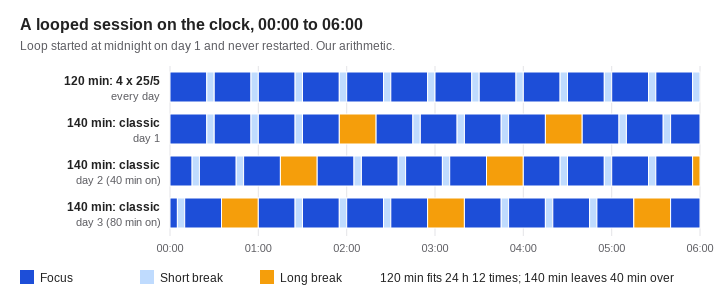
For a loop, a 120-minute plan of four 25/5 rounds, without the long break, is the easy choice: if the loop starts at midnight, a focus block starts every hour and half hour, and you can write "breaks at :25 and :55" in the description. A 140-minute session is still fine to upload; just do not promise clock times on a loop of it.
Exact length matters here. The missing last second from the timer section would make a 120-minute file 7,199 seconds long, and at 12 plays a day the breaks would drift 12 seconds a day, about 6 minutes a month (our arithmetic). Check the length with ffprobe -v error -show_entries format=duration -of csv=p=0 study-with-me.mp4 before you upload: with the end image it reads about 7200.03 (our 60-second test read 60.03). If your loop tool can start the file at a fixed clock time each day, use it: that resets any small drift. A clock that shows the real time is a different job: it has to be drawn live, and our live clock test shows how one that counts frames falls behind.
Run a 24/7 study stream without a computer
A looped session needs a machine that streams it all day. Your laptop is the one you study on, so a study stream is a good case for running the loop somewhere else. Our 24/7 stream guide compares the options in detail.
Before you publish
- The session follows one plan, and the title says the length, the plan and the sound.
- The timer starts with the first focus block and matches your breaks, and the last second shows (one extra image at the end).
- A file for a 24/7 loop divides 24 hours exactly (60 or 120 minutes), and ffprobe shows the expected length.
- Music, if any, is licensed for YouTube and live streaming, or comes from the Audio Library.
- A looped stream says it is a recording; no staged chat or claims that you are there.
- Any AI-generated scene is disclosed.
- Each video is its own session, not the same one reposted.
FAQ
How long should a study with me video be?
Long enough for a real study session. A classic Pomodoro plan of four 25-minute blocks with breaks runs about 140 minutes, and one to three hours is a common range. The format is "real-time, often hours long".
Do I have to show my face?
No. Many study with me videos show only the desk, hands and books. What viewers need is steady work, a timer and calm sound.
Can I loop one recording as a 24/7 live stream?
Yes, if it is honest about being a loop. Loopcast's rule is: "Do not stage chat or imply someone is present and interacting." Say in the title or description that it is a recorded session on repeat.
How do I add a Pomodoro timer to my video?
Add it while recording with OBS or an editor, or afterwards: draw one image per second of the plan with a short Python script and overlay them with ffmpeg. Both commands, tested, are in the timer section above.
Why do the breaks on my looped study stream fall at different times each day?
Because the file length does not divide 24 hours. A 140-minute session plays 10.3 times a day, so every day starts 40 minutes further into the plan (our arithmetic). A 60- or 120-minute file plays a whole number of times and keeps the breaks at the same clock times; check that ffprobe shows the full length, as a file one second short drifts 12 seconds a day at 12 plays.
Can a study with me channel be monetized?
It can, if every video is a real, distinct session. YouTube does not monetize content that is "mass-produced, generic, repetitive, or manipulative", so reposting the same session under new titles puts the channel at risk.
Sources
- Wikipedia: StudyTube and Pomodoro Technique.
- YouTube Help: archive live streams, spam, deceptive practices and scams policies, disclosing AI-generated content, Audio Library and channel monetization policies.
- Timer script and ffmpeg overlay tested on our server (Python Pillow 11.3, ffmpeg 7.0.2); last-image fix, timer offset, chime track and loop-length checks tested.
- Loopcast: YouTube page and pricing.