

Short answer
- The proven 24/7 ideas are music (lofi), sleep and white noise, ambient scenery, study with me, a radio station or podcast on loop, and a live camera on wildlife or a fish tank.
- Less crowded ideas are slow TV journeys, a clock or countdown, a weather screen built on public data, and space footage from NASA.
- Rights come first. You need to own or license every sound and picture for YouTube, around the clock, and a broadcast licence or a creator's permission is often not enough.
- The rule that hits most of them is YouTube's inauthentic and reused content policy, which can switch off ads for a whole channel.
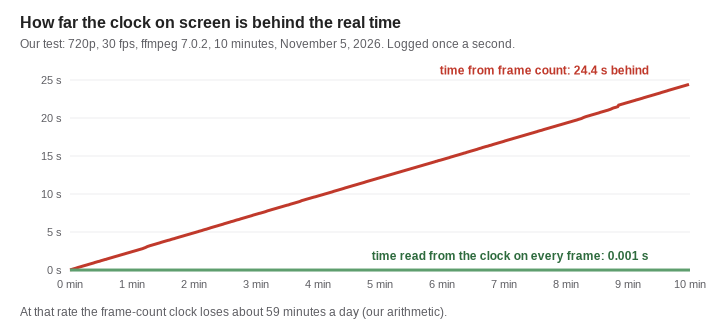
- A live clock must read the time on every frame. In our test, a clock that counted frames instead fell 24 seconds behind in 10 minutes.
- A 24/7 stream has no full replay: YouTube says streams over 12 hours "may not be captured at all".
From YouTube Help, NOAA, NASA and Loopcast.
All twelve ideas side by side
Effort and cost below are our own rating for a single channel, not measured data. Looped means a video file playing on repeat; live means a camera, a microphone or a screen that changes in real time.
| Idea | Rights you need | Effort | Running cost | Live or looped | Rule most likely to hit it |
|---|---|---|---|---|---|
| Lofi or other music | Music licensed for YouTube live and monetization, a visual you own | Medium | Low | Looped | Reused content if the tracks are not yours; Content ID |
| White noise and sleep sounds | Your own recordings or generated noise | Low | Low | Looped | Repetitive content across many near-identical videos |
| Ambient scenery | Footage you shot or licensed for YouTube | Medium | Low | Looped | Reused content for stock or found footage |
| Study with me | Yourself on camera, licensed music if any | High | Low | Live or looped | Pretending a loop is live |
| Radio station relay | Rights for YouTube, not just a webcast licence | Medium | Low to medium | Live | Content ID on the music |
| Podcast 24/7 | Your own episodes, music beds cleared for YouTube | Low | Low | Looped | Music in old episodes; ads rules |
| Wildlife or aquarium cam | Your own camera, nobody filmed without consent | Medium to high | Medium (upload bandwidth, power) | Live | Privacy |
| Slow TV journey | Footage you filmed, music if any | High to film, low to run | Low | Looped | Repetition if the same short ride loops |
| Clock or countdown | Fonts and sounds you may use | Medium | Medium (a computer renders it) | Live | Repetitive, minimal content |
| Weather screen | Public domain data such as the US National Weather Service, maps with their own licence | High | Medium (a computer renders it) | Live | Scrolling text with no added value |
| Space and Earth footage | NASA media, credited, no implied endorsement | Medium | Low | Looped | Reused content |
| News ticker | Usually none you can get for headlines from others | High | Medium | Live | Reused content, named outright by YouTube |
Two patterns stand out. The looped ideas are cheap to run but sit closest to YouTube's repetition rules, so the work goes into making each stream distinct. The live ideas avoid repetition but need a machine or a camera that never stops. Every idea also inherits the 12-hour archive limit, covered in our guide to live stream time limits.
The YouTube rules every idea runs into
Before the ideas, the three rules that decide whether a 24/7 stream can earn. All three are in YouTube's channel monetization policies.
- Inauthentic content. YouTube's examples of what cannot be monetized start with "Similar or repetitive content with low educational value, commentary, narratives, or minimal variation across videos". It also says "channels where content feels interchangeable from video to video are not allowed to monetize". A channel of ten streams that differ only in title fits that description.
- Reused content. This covers material that is already on YouTube or elsewhere online without enough added by you, and it is not a copyright rule. YouTube writes: "This policy applies even if you have permission from the original creator." A licence protects you from claims; it does not make the stream yours.
- Templated text. One example of content that cannot be monetized is "Image slideshows, templated storylines, or scrolling text with minimal or no narrative, commentary, or educational value". That matters for tickers, clocks and data screens.
Our guide to inauthentic content and 24/7 channels matches common loop formats to YouTube's wording one by one. The money side, including what a stream earns once it is allowed to, is in do lofi channels make money?
1. Lofi and other music streams
The best-known 24/7 format: one scene, a long mix, chat running beside it. Rights: every track has to be licensed for YouTube live streams and monetization, and the visual has to be yours or licensed. Effort: medium, mostly in building a mix that loops without a seam. Live or looped: looped. Rule: streaming other producers' tracks is where reused content and Content ID meet.
Start with how to start a lofi YouTube channel (or, for calm music, how to start a relaxing or meditation music channel), then how to make a 24/7 lofi stream for the build. For the music, see where lofi channels get their music and our clause-by-clause comparison of music licences for 24/7 streams. If you also stream to Kick, read can you play copyrighted music on Kick? first.
2. White noise and sleep sounds
Rain, fans, brown noise and ocean sounds run all night for people who sleep with them on. Rights: record or generate the sound yourself; a sound pack from a library may carry terms that rule out long loops. Effort: low. Live or looped: looped. Rule: repetition. Noise channels are the clearest case of "minimal variation across videos", so each stream needs its own sound and picture, not a recolour of the last one. Our guide to making a white noise or sleep sounds channel covers uploads versus a live stream and the earnings evidence.
3. Ambient scenery
A fireplace, a rainy street, a forest, a snowy cabin, a coffee shop, with natural sound. Rights: footage you filmed, or stock footage whose licence allows YouTube use; check that the licence covers a 24/7 loop, not only a video. Effort: medium, since a visible jump at the loop point gives it away. Live or looped: looped. Rule: stock or found footage is the reused content risk; footage you shot yourself is the strongest answer. See how to make ambient videos for YouTube for a seamless crossfade and file sizes. For a December fireplace stream in particular, see our fireplace video guide.
4. Study with me
A person working at a desk on a Pomodoro timer, so viewers can work alongside. Rights: you are the content; any music needs the same YouTube licence as a lofi stream. Effort: high if you stream in real time, lower if you loop recorded sessions. Live or looped: either. Rule: honesty. A recorded session on repeat should say so, rather than imply you are there right now. Our study with me channel guide has a tested countdown overlay.
5. A radio station on YouTube
A station's output, live, with a still or a simple visual. Rights: this is the trap. A webcast licence for the station's own website does not cover YouTube, and the commercial music in a typical station's playlist will meet Content ID. Effort: medium. Live or looped: live, an audio feed turned into video. Rule: copyright claims on the music. Read can you stream your radio station on YouTube? before you plan it; talk, news and your own music are the parts a station can usually stream.
6. A podcast as a 24/7 stream
A back catalogue playing around the clock, so new listeners find the show at any hour. Rights: the episodes are yours, but check music beds and any guest or sponsor agreements. Effort: low once the episodes are joined into one reel. Live or looped: looped. Rule: old episodes with music you did not clear for YouTube. Our guide to running a podcast as a 24/7 live stream compares it with YouTube's RSS podcast upload and has a tested reel command.
7. Wildlife, bird feeder or aquarium cam
The one idea that is live in the full sense: a camera on a feeder, a nest box, a pond or a fish tank. Rights: the picture is yours, but the frame must not catch neighbours, passers-by, faces or voices. Effort: medium to high, mostly in keeping the camera and its connection up for weeks. Cost: upload bandwidth; at YouTube's 5 Mbps minimum for 1080p at 30 fps, that is about 54 GB a day by our arithmetic. Live or looped: live. Rule: privacy. Our guide to live streaming a bird feeder or aquarium has a tested relay command and a restart loop; for a recorded tank on a loop instead of a camera, see our aquarium video guide.
8. Slow TV journeys
A whole train ride, ferry crossing or canal trip filmed from the front in real time, with no cuts. Rights: film it yourself; filming on public transport or private property may need permission from the operator. Effort: high to film, low to run once recorded. Live or looped: looped, unless you stream a journey as it happens. Rule: one short ride on repeat starts to look like the repetition YouTube describes; several long journeys in rotation do not. It is a strong fit for a schedule that changes the journey by day of the week. Our slow TV guide covers filming, operator permission and live versus looped journeys, and our test of steadying a shaky cab ride in ffmpeg.
9. A clock or countdown
A world clock, a countdown to New Year or a launch, a timer to the end of the working day. Rights: mostly yours; check the licence of any font or chime. Effort: medium. Live or looped: live. A clock has to be drawn in real time by a computer that stays on, because a looped file would show the wrong time after the first lap. Rule: on its own, a clock is close to YouTube's "minimal or no narrative" example. It works better as a frame for something: a countdown event with music you own, or a study session timer.
Our test: drawing a live clock
We built one to see what goes wrong. Our ffmpeg build has no drawtext filter, so a short Python script (with the Pillow library) draws each frame and pipes it into ffmpeg, which encodes it the way YouTube asks: 30 fps, a keyframe every 2 seconds, constant bitrate. We tried two ways of choosing the time each frame shows. The first counts frames (start time plus frames sent divided by 30) and waits a thirtieth of a second between frames, which is how most first attempts look. The second reads the clock for every frame and sends frames on fixed deadlines. We ran each for 10 minutes, then ran a second pair in which we paused the encoder for 10 seconds, the way a stalled upload holds it up.
| Measured | Time from frame count | Time read on every frame |
|---|---|---|
| Clock behind real time after 1 minute | 2.4 s | 0.001 s |
| Clock behind real time after 10 minutes | 24.4 s | 0.001 s |
| Frames sent in 10 minutes (18,000 due) | 17,238 | 18,000 |
| Video in the output after 10 minutes | 575.6 s | 600.1 s |
| After a 10-second encoder stall | 10 s more behind, for good | on time again from the next frame |
| At the same rate for a day | about 59 minutes behind | on time |
The frame-count clock fails because each wait of a thirtieth of a second, plus the time to hand over the frame, takes slightly longer than a thirtieth of a second. It sent 28.7 frames a second instead of 30, so its clock lost 2.4 seconds a minute and the stream carried less video than real time. The fix is in the script below: the time comes from the computer's clock, and after a stall the missed frames are skipped instead of sent late. It draws each second once and reuses it for 30 frames.
#!/usr/bin/env python3
# clock.py: draws HH:MM:SS at 30 fps as raw frames for ffmpeg
import sys, time, datetime
from PIL import Image, ImageDraw, ImageFont
W, H, FPS = 1280, 720, 30
font = ImageFont.truetype('/usr/share/fonts/liberation-mono/LiberationMono-Bold.ttf', H // 4)
out, last, img = sys.stdout.buffer, None, None
t0, n = time.time(), 0
while True:
    due = t0 + n / FPS
    now = time.time()
    if now - due > 1 / FPS:            # behind after a stall: skip the missed frames
        n = int((now - t0) * FPS)
        due = t0 + n / FPS
    elif due > now:
        time.sleep(due - now)
    sec = int(due)                     # the time comes from the clock, not the frame count
    if sec != last:                    # draw each second once, reuse it for 30 frames
        im = Image.new('RGB', (W, H), (16, 20, 28))
        ImageDraw.Draw(im).text((W // 2, H // 2), datetime.datetime.fromtimestamp(sec).strftime('%H:%M:%S'),
                                font=font, fill=(235, 235, 235), anchor='mm')
        img, last = im.tobytes(), sec
    out.write(img)
    n += 1
Run it into ffmpeg with your stream key (keep the key private). The silent audio track can be replaced by music you own.
python3 clock.py | ffmpeg -use_wallclock_as_timestamps 1 -f rawvideo -pix_fmt rgb24 -s 1280x720 -r 30 -i - \
  -re -f lavfi -i anullsrc=r=44100:cl=stereo \
  -fps_mode cfr -r 30 -c:v libx264 -preset veryfast -pix_fmt yuv420p -g 60 \
  -b:v 3000k -minrate 3000k -maxrate 3000k -bufsize 3000k -x264-params nal-hrd=cbr \
  -c:a aac -b:a 128k -f flv "rtmp://a.rtmp.youtube.com/live2/YOUR-STREAM-KEY"
We checked this exact pair for 60 seconds into a file: 1,800 frames, 60.07 seconds, and the last frame showed the second in which the run ended. On our server the encoder used about 33% of one CPU core at 720p and 3 Mbps, and 78% at 1080p and 5 Mbps; the drawing script used 2% and 5%. The 720p stream came to 1.36 GB an hour, about 33 GB a day, and the 1080p one to about 54 GB a day (our arithmetic from the test files). That is why the table above rates the running cost of a clock as medium: a computer that stays on and an upload that never stops.
One limit no script fixes: viewers see the stream late. YouTube says "Most viewers of a low-latency stream will experience latency less than 10 seconds", and less than 5 seconds at ultra-low latency. A seconds display is therefore a few seconds behind on every screen, by a different amount for each viewer. For a world clock, show hours and minutes. For a countdown to midnight, choose ultra-low latency and expect viewers to see zero a little late.
10. A weather screen from public data
Current conditions, forecasts and radar for a city or region, refreshed through the day. Rights: clear for US government weather data. The National Weather Service's disclaimer says its web pages are in the public domain "unless specifically noted otherwise" and "may be used without charge for any lawful purpose", as long as you do not claim it as your own, imply an endorsement by NOAA or NWS, or present a modified version as official. Base maps from other providers carry their own licences, and data from other countries' weather services has its own terms. Effort: high, since you build and host the screen. Live or looped: live. Rule: a page of numbers is close to "scrolling text with minimal or no narrative", so add something of your own, such as a local view from your own camera or your own short explanations.
11. Space and Earth footage
Earth from orbit, rocket launches, telescope images set to calm sound. Rights: NASA's media guidelines say its images, audio and video "generally are not subject to copyright in the United States", and add: "NASA should be acknowledged as the source of the material." Some NASA pages carry third-party material marked as copyrighted, and commercial use must not suggest NASA endorses you. Effort: medium. Live or looped: looped. Rule: reused content. NASA footage is widely reused on YouTube, so the substance has to come from you: your own edit, sound, narration or explanations. Our ambient video guide applies to the build.
12. A news ticker: the one to skip
A loop of headlines from news sites or feeds looks easy to automate. YouTube's reused content section names it directly as an example: "Content that exclusively features readings of other materials you did not originally create, like text from websites or news feeds". Headlines and articles also belong to their publishers. Unless you write the news yourself, we would not build this one.
Running the looped ideas
Seven of the twelve ideas are a video file on repeat: music, sleep sounds, ambient, a recorded study session, a podcast reel, a slow TV journey and space footage. They can run from OBS on your own computer (see how to loop a video in OBS), from a server you rent, or from a hosted service. The live ideas (a radio relay, a camera, a clock, a weather screen) need software that reads a live source, which a file looper cannot replace. Either way, the chat stays open all night; our guide to moderating YouTube live chat on a 24/7 stream covers the settings that hold without a person.
Loopcast's own page adds a fair warning for any loop: "Looping a few seconds of footage over and over is the fastest way to be treated as low-effort repetitive content." Loop something long.
How to choose
- Pick an idea where you can own or license every sound and picture for YouTube, around the clock.
- Decide live or looped. Looped is cheaper to run; live needs a computer or camera that never stops.
- Plan how each stream will differ from the next, so the channel does not read as repetitive or reused.
- Label a loop as a loop, and do not imply someone is there when nobody is.
- Record or clip highlights yourself. YouTube says "We recommend recording a local archive as a backup."
FAQ
What are good 24 hour live stream ideas for YouTube?
The proven ones are lofi or other music, white noise and sleep sounds, ambient scenery, study with me, a radio station, a podcast reel and a wildlife or aquarium camera. Less crowded ideas are slow TV journeys, clocks and countdowns, weather screens built on public data and NASA space footage.
Which 24/7 stream idea is easiest to start?
In our rating, white noise and a podcast reel need the least work, because you can make or already own every sound. The easiest to start is not always the easiest to monetize: noise channels sit closest to YouTube's repetitive content examples.
Can I make money from a 24/7 live stream?
Only if the channel passes YouTube's monetization policies. YouTube says its reused content policy "applies to your channel as a whole", and that it "applies even if you have permission from the original creator".
Can I rebroadcast someone else's live stream 24/7?
Not as a way to earn. Even with permission, a stream of someone else's material falls under YouTube's reused content policy unless you add something substantial of your own.
Can I loop a video of a clock on a 24/7 stream?
No, a looped file shows the wrong time after the first lap. A clock has to be drawn live, and it has to read the real time for every frame: in our test, a clock that counted frames fell 24 seconds behind in 10 minutes, about 59 minutes a day by our arithmetic.
Will YouTube save my 24 hour stream as a video?
Not in full. YouTube says streams over 12 hours "may not be captured at all", so record locally or clip highlights while you are live.
Sources
- YouTube Help: channel monetization policies (inauthentic and reused content), archive live streams, live encoder settings and bitrates, live streaming latency.
- NOAA National Weather Service: disclaimer and use of NWS information.
- NASA: guidelines for using NASA images and media.
- Loopcast: YouTube page and pricing.